Posts Tagged ‘deploy’

May 25, 2021

A Virtual Nomad to Carry Your Bags!

After much code wrangling, we are happy to announce the release of new Virtual Bellhop Nomads! Similar to the Jewel Thief and Warrior Nomads, the original Bellhop Nomads were only bouncing to the physical types of their corresponding landing pad categories.

10 NEW Virtual Bellhop Nomads have been unleashed on the map. To keep the total number of each type at 20, this means that 10 of the original Virtual Bellhop Nomads will be removed. Like other nomads, they will bounce every 12 hours or when captured.

These captures will also count toward the Nomad Munzee Badge Line.

Landing Pads:

Points:

  • Capture: 500
  • CapOn (for host owner): 250

Better your chances at capping a Virtual Bellhop Nomad by deploying a Virtual Destination Munzee near you! Please note that Skylands are not included in its list of landing pads. If you don’t already have any Virtual Destination Munzees in your inventory, you can shop the collection at the Freeze Tag Store, or perhaps make a trade with other players who have them stocked up!

To learn more about Nomads, check out the Help Guide article!

We hope you look forward to spotting these extremely rare pieces on the map!

Munzee on!

May 21, 2021

A Baby Animal SO CUTE It’s Causing Pandamonium!

In honor of National Endangered Species Day, these adorable Baby Pandas are on sale NOW in the Freeze Tag Online Store!

Similar to last year’s Aussie Animals, a portion of the proceeds from this sale will be donated to the World Wildlife Fund (WWF), so thank you all for supporting this great cause!

Baby Panda Details

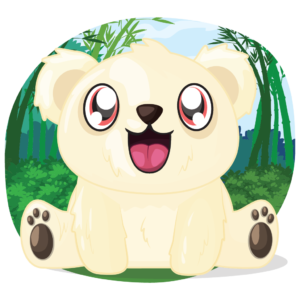
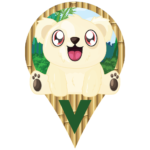
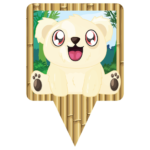
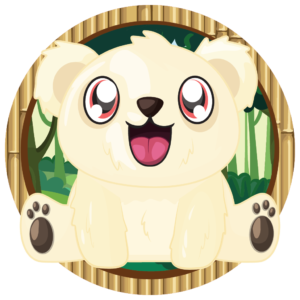
Like the other Baby Animals, the Baby Panda is a temporary POB. It is available in the Freeze Tag Store for the low price of $5! If you buy a full set of 4 Baby Pandas, you’ll receive an Albino Baby Panda tPOB (shown above) for free! This is the only way to get one of these cute cream-colored variants so shop now before the all flee the store at 12:00 MHQ on June 1st. You can purchase Baby Pandas HERE.

They will bounce to both physical and virtual munzees and stay on the map until 23:59 MHQ on July 20, when they will be automatically archived on your account.

  • Baby Panda
    • Deploy: 300 points
    • Capture: 200 points
    • CapOn: 100 points
  • Albino Baby Panda
    • Deploy: 500 points
    • Capture: 300 points
    • CapOn: 150 points

You can find these rare bears bouncing to the following landing pads every 6 hours or when captured:

Like the other Baby Animals, Baby Pandas and Albino Baby Pandas will be available for multi-capture. That means players can capture a Baby Panda or Albino Baby Panda on their own munzees, any previously captured munzees, and more than once if the same Baby Panda or Albino Baby Panda visits you. However, Baby Pandas and Albino Baby Pandas are non-blastable. They will be attracted to either Physical Magnets or Virtual Magnets on their respective landing pads. You can access Baby Pandas and Albino Baby Pandas under the “All Limited Edition Specials” and “All Expiring Specials” filters.

Badges

Deploying Baby Panda and Albino Baby Panda will earn you the following badges, respectively:

Additionally, there will be three badges to earn based on number of captures of Baby Pandas. But just how many captures it takes to earn all 3 badges will be kept a secret! However, we will reveal the first badge in the line, which appears as follows:

Lucky Lantern- Capture one Baby Panda Munzee.

Remember these temporary POBs will only be available for capture until July 20th, so cap as many as you can and keep them bouncing!

Munzee on!

May 20, 2021

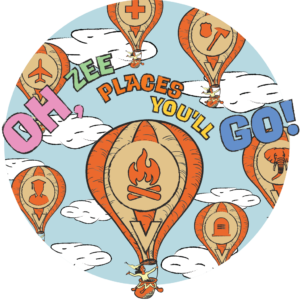
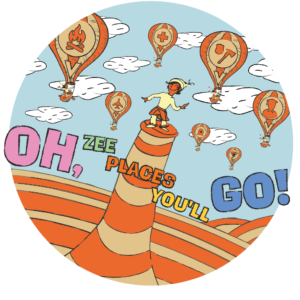
Oh, ZEE Places You’ll Go During This Month’s ZEE-Dayz!

Last year we kicked off our first official ZEE-Dayz with a very popular double radii weekend! We think it’s been a good amount of time since then, so this year, on top of double radii, we’ve got some special badges for you to earn and more! Read on to get the deets!

Double Radii Details

From the period of Thursday, May 20th at 12:00 MHQ through Monday, May 24th at 23:59 MHQ, enjoy double capture radii on ALL Places and Flats excluding Fancy Flats!

To ensure you’ve got a lot of Places to go to, we’ve sweetened the deal with…

Limited-Time Badges

For the same period as double radii, you can earn a special badge for capturing a certain number of Places, and another for deploying at least 1 Place (since the deploy process is a bit more involved than other types). You can see what these badges look like below!

We’ll keep the exact requirement for the capture badge a secret, but it shouldn’t be too hard to get!

New Items in the Store!

A new collection featuring the limited-time badge art will be available in the Freeze Tag Store!

As you can see in the image above, the collection includes a NEW personal tag, along with all the gear you need for a trip! Also, this is a friendly reminder that we released 2 new Places and a personal tag earlier in the week!

Rover’s Ability Boosted!

For the same period as double radii, you will be able to send Rover to capture Emeralds, Sapphires, Citrines, and Onyxes that are out of the original range, but within double the original range using Rover Treats! To clarify, normally only Amethysts and virtual scattered munzees are eligible to have their capture radius extended — the remaining four virtual Jewels will be eligible until 23:59 MHQ on May 24!

Remember that the popup to send Rover to capture a munzee will only appear if you are out of the original range, so make sure to keep an eye out!

If you don’t have a Rover with you and there aren’t any nearby for you to pick up, you can purchase one from the Freeze Tag Store HERE, or if you’re on your Munzee-playing device, you can purchase it in the In-App Store HERE. To learn more about how Rover works visit our Help Guide articles HERE!

We hope you enjoy going places this weekend!

Munzee on!

May 17, 2021

NEW Places Munzees We’d Love to Visit!

Feeling like a dog itching to go on a walk? Us too! While many of us have adapted to working in the current situation, playing in the current situation is severely limited — of course, there are books, video games, movies, TV shows, and music you can safely consume at home — but they have their limits. In preparation for all the good times that are a long time coming, we’ve developed 2 NEW Places Munzees! These have been added to the Freeze Tag store as of 12:00 MHQ today. Shop them HERE! They are limited to one per account per 30 days, like the other Places.


NEW Places Details

Joining the ever-growing roster of Places are the Entertainment and Pet munzees. The past year was pretty short on fun, so we’d love to see where you go to get those endorphins up! We got the idea for these types from you, the players, so we’re confident they’ll be a welcome addition to the game. As with other Places munzees, these can be captured daily! They will also contribute progress towards the Places Capture badge line and the Places Streak badge line.

Capture Radius: 1,000 feet, not blastable

Deploy: 40 points

Capture: 20 points

CapOn: 10 points

To access these munzees, turn on your “Virtual – Places” filters. For more information on how to deploy a Places munzee, you can check out our Help Guide article. This document will be updated with our guidelines should any changes occur. Please note that these new places should be easily identifiable from Google Maps.

Deploy Guidelines:

Remember a Places Munzee has to have its location approved for deployment, so please be sure to read through these guidelines carefully. It is also very helpful for you to update the name and notes of the Munzee so our reviewers can verify it quickly to get it deployed for you.

Entertainment: This is for indoor places where you go to play! Think arcades, skating rinks, laser tag locations, BIG malls, and casinos! Take care not to deploy these where a Cinema or Golf Places might be a better fit!

Pet: This is for places relating to your furry friends! Think pet stores, dog parks/beaches, humane societies, and animal shelters! Not to be confused with Wildlife Places (particularly the last two on that list), which are for non-pet animals.

NEW Personal Tag

We’re also excited to announce a new personal tag featuring the new Places Munzees! You can shop it HERE!

Places Munzees are very unique due to the much larger cap radius (as compared with other munzee types) and aforementioned daily capture ability. As you can’t capture your own munzees, trade Places munzees with other players to make the most of your deploys!

Munzee on!

May 15, 2021

Secret ZeeOps- Operation: Lady Luck (May 2021)

UPDATE: Information on Operation: Green Thumb was corrected below.

Agents, we were lucky to have an uneventful April — perhaps all the crooks were on Spring Break? With the extra time, we made some much-needed updates to our system! Unfortunately, trouble is brewing once again. If you’re game, a new Secret ZeeOp is available in the ZeeOps Hub. Operation: Green Thumb was removed from the ZeeOps Hub at the end of April. However, if you’ve already purchased Operation: Green Thumb, you will be able to complete it and collect rewards even after it is no longer available for purchase.

Can you smoke out some unsavory characters that have made the new hot spot their home base? If you complete ALL the missions in Operation: Lady Luck, you’ll receive the snazzy badge below, along with the Arctic L.A.S.E.R. Shark Munzee (more info below!) and various other rewards listed in the app!

There are 3 levels. Level 1 has 3 missions, Level 2 has 5 missions, and Level 3 has 5 missions. Each level ends with more prizes.

We may share this information moving forward with other Operations but possibly not.

Arctic L.A.S.E.R. Shark Details

The Arctic L.A.S.E.R. Shark functions the same way as the regular L.A.S.E.R. Shark. You can refer to our Help Guide article about it HERE!

The only difference, other than its color, is that it also lands on Joystick munzees (both physical and virtual).

With the release of this L.A.S.E.R. Shark variant, we’ve created a new deploy badge, and also have featured it in the line of capture badges released in March. While we’ll keep the capture badge a secret, you can sneak a peek at the deploy badge below:

On behalf of MHQ, we thank you for your continued service.

This message will self destruct in 3… 2… 1…

May 12, 2021

Roverhaul Part 3!

Roverhaul Part 1 gave Rover the ability to dig up Jewel Shards while accompanying you on Jewel-capping sessions. Roverhaul Part 2 gave Rover the ability to extend your capture radius with Rover Treats. What does Roverhaul Part 3 have in store? A combination of the two!

Another Trick in Rover’s Toolkit!

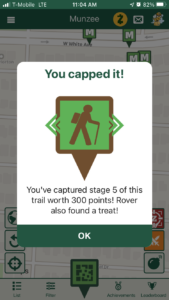
When you capture the last stage of a Physical Trail Munzee while a Rover is with you, you have a chance of finding a Rover Treat! In addition, the deployer of the trail will also receive a Rover Treat! After all, the deployer did go to the effort of deploying and maintaining their Trail, which is not an easy feat!

Please note that this is only for Physical Trails. The chance of finding Rover Treats may spread to other types in the future!

The popup that appears after you’ve captured the final stage of a Trail will let you know if Rover has found any, so make sure to keep an eye out! You will also find them on your credits list.

Of course, if you need more Rover Treats, you can pick them up in the In-App Store for 40 Zeds, or get a pack of 10 Rover Treats in the Freeze Tag Store for $3.

As we continue to refine and improve the Munzee app, expect more Rover-related news!

Munzee on!

May 11, 2021

Updates to Quick Deploy and MORE in the App!

UPDATE: There was a mix-up involving the build number and our first note in bold red text below — it’s been corrected now!

Earlier in the year, we updated the Munzee Website with some improvements to the Quick Deploy process, which received a lot of positive feedback! We knew the next step was to bring over similar improvements to the app, so here’s a rundown of what you’ll find in the latest OTA (over-the-air) update! The build will be #736 — try restarting your app to see if it downloads!

An Improved Quick Deploy Experience!

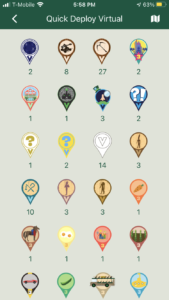
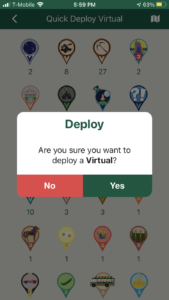
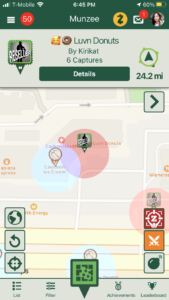
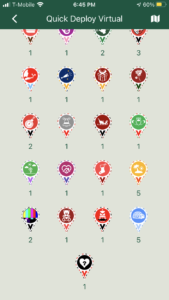
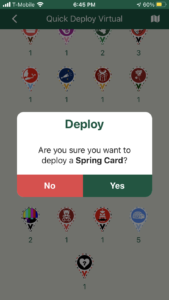
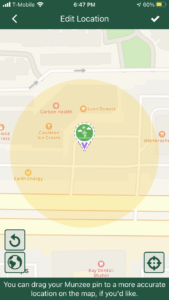
Now, when you hold down the green pin button, instead of a list of each undeployed munzee ordered from newest to oldest, they are now grouped by type, along with a confirmation pop up to avoid accidental deploys, as you can see below:

In addition, the screens above will only show munzees that have never been deployed. We thought this change would be more convenient for players as most previously deployed munzees will require you to be within a certain range of where they were originally deployed to redeploy them. If you do need to redeploy a munzee, you can still access it by navigating to your Profile –> [Inventory] –> [Undeployed Munzees].

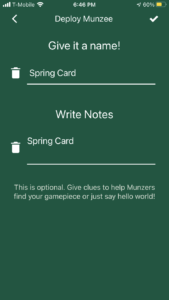
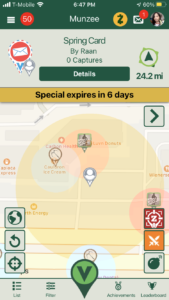
You may recall that the old Quick Deploy process allowed you to view the map while you chose which munzee to deploy. While that is no longer the case, we did make another tweak that should be a good compromise: now, Quick Deploy will deploy where the map is centered on, rather than where you (and your blue dot) are located. As an example, here’s how you can quickly deploy a Greeting Card near a friend:

You can also use this to quickly drop munzees around upcoming event locations, if the area isn’t too crowded. Simply open the side menu, tap on [Munzee Events], and then tap on an Event Indicator pin to get to its details and view it on the map!

Please note that (1) Destinations like Skylands and Virtual Condos will still be deployed at the player’s current location, even if you use Quick Deploy — and (2) this change has only been made for the Quick Deploy process — all other Deploy processes in the app will still deploy at your current location.

Other Fixes/Improvements!

  • Dismissing the Send Rover pop up when given the option with the extended capture radius will no longer deselect the Munzee
  • Tapping on a badge from the Notifications list will scroll you down to the exact location of that badge in the Achievements area — this was how we had it working originally, but it seems to have broken at some point — we’ve fixed it and hopefully it stays that way! ?
  • Setting off blasts while moving quickly should blast the Munzees in the exact location you’re in when tapping on the “Fire!” button, thanks to caching improvements!

We hope you enjoy the changes we’ve made in this update! Remember that we will always maintain our Update Log HERE. Feel free to check it out whenever you like!

Munzee on!

May 6, 2021

Destination Renovation Part 2: Virtual Resorts!

Last year we took the first step in converting our Destination Munzees into a more flexible system with Motels and Destination Credits. It’s been tough to rework these more complex game pieces, but we are excited to announce that Destination Renovations are now LIVE for Virtual Resort Munzees!

This new feature will allow players to renovate Virtual Resorts and add additional rooms for even more capping fun. You’ll be able to renovate any Virtual Resort Munzee (whether you own it or not) on both the web and Munzee app. Find a breakdown of all the details below!

Virtual Resort Details

Virtual Resort Munzees are now on a star-based system like Motels. Each star ranking equals 5 rooms, so effective immediately all original Virtual Resort Munzees have been converted into 3-Star Virtual Resorts. The icon images on the map are currently updating, but if you do see a “blank” or original Virtual Resort icon please note that, that is indeed a 3-Star Virtual Resort.

Renovating Virtual Resorts will offer the following:

  • 3-Star Virtual Resort: 15 rooms (Standard Virtual Resort)
  • 4-Star Virtual Resort: 20 Rooms
  • 5-Star Virtual Resort: 25 Rooms

By renovating you could be a part of a 5-Star Virtual Resort that is worth a substantial amount of points! Every time you Renovate a Virtual Resort you’ll earn 50 points as well, so get your construction hat on!

The Destination Renovation is currently only available for Virtual Resort and Motel Munzees, but it’s safe to say construction on other Destination Munzee types is slated for some time in the future!

So how do you Renovate a Virtual Resort? The same way as Renovating a Motel! Check out our Help Guide article if you need a refresher!

As Virtual Resorts are complete Virtual Munzees, they have NOT been converted into Destination Credits. Players will need Destination Credits to renovate Virtual Resorts.

  • Renovating a Virtual Resort = 1 Destination Credit per 5 rooms.

Don’t forget to check if you already have Destination Credits in your inventory! As more physical Destination types are given the ability to renovate, these types may also get converted into Destination Credits. Otherwise, you can purchase Destination Credits in the Freeze Tag Online Store and the In-App Store (click HERE if you’re on your Munzee-playing device), so be sure to stock up in case you come across any Virtual Resorts or Motels with no vacancy!

We hope you’re raring to use more Destination Credits with this new option! We’re always looking for ways to refresh the map and add value to game pieces you may already own!

Munzee on!

May 3, 2021

Can You Reunite the Lost Socks With Their Other Halves?

Did you know that May 24th is National Scavenger Hunt Day? As it’s the perfect holiday to highlight Munzee, we’ve decided to celebrate it the ENTIRE MONTH! We have a few surprises in the works, but as it IS a new month, the first order of business was to create some new themed specials! We took inspiration from a holiday that’s coming up even sooner — National Lost Sock Memorial Day on May 9th! Starting at 12:00 MHQ today, Lost Socks will bounce around the map until 23:59 MHQ on May 31st.

Classic scavenger hunts often require you to find socks of a particular (and usually uncommon) color (i.e. red), so we thought turning them into specials to chase would be a fun twist! A total of 1,520 Lost Sock specials will be unleashed! That breaks down into 95 of each of the 16 socks. They will bounce around every 4 hours or when capped.

You can find these forlorn foot coverings at the following:

Points

  • Capture: 150 points
  • CapOn: 50 points

Lost Socks will be attracted to Magnets. To access these specials, please turn on your “All Expiring Specials” and “All Limited Edition Specials” filters.

Badges

There will be eight badges to earn for these specials. All you need to do is capture each of the Lost Socks shown above! By doing so, you will have completed each pair of socks! You can see the first badge below:

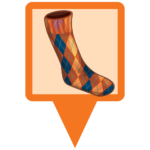
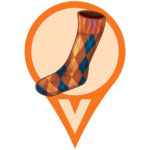
Lozenge Legs- Capture the Left and Right Argyle Sock specials to complete the pair.

It’s up to you to find the socks for the remaining 7 badges! Cap as many of these specials as you can to set yourself up for success!

Munzee on!