
Posts Tagged ‘virtuals’

May 2, 2022

Premium Membership Follow-Up

Last week, we announced an update we were making to Premium Memberships. Now that the date and time we stated has come, we wanted to take this opportunity to review the list of current Premium Membership benefits — if you’re a Premium Member, you may not be taking advantage of all there is to offer! Here is the most up-to-date list of everything you get, with links to more info and visual guides underneath:

Unlocked In-App Features

  • Ability to view exclusive Premium Filters
    • Hide captured Munzees with red checkmarks from the map
    • Find special types or Munzees that will expire soon
  • Ability to customize Preset Filters
    • NEW: Preset Filter slots have increased from 5 to 10!
  • Ability to view a real-time Daily Leaderboard
  • Ability to upload photos to Munzees
  • Ability to earn/display special Titles
  • Ability to create Clans
  • Ability to hold an extra QRate
  • Ability to delete a QRate once per day
  • Ability to reroll Daily ZeeOps missions once per day
  • Ability to view caps/deploys for specific days on the Daily Activity Tracker
  • Ability to filter blasts to capture specific types
  • NEW: Ability to attract an extra bouncer from magnets
    • Non-Landing Pad Destination munzees (i.e. Greenies) will now attract up to 4 bouncers when magnetized
    • Landing Pad Destination munzees (i.e. Treehouses) will now attract up to 7 bouncers when magnetized
Premium Filters Preset Filters Daily Leaderboard
Upload Photos Special Titles Create Clans
Extra QRate Delete QRate Daily ZeeOps Reroll
View Caps/Deploys Filtered Blasts Magnet Boost

Unlocked Outside-App Features

  • Ability to view detailed Munzee activity stats collectively known as Statzee
  • Ability to receive email notifications when a new munzee is deployed

Goodies Received

  • Monthly Premium Memberships – on the 15th of each month

If you aren’t already a Premium Member, you can purchase a Yearly Membership via the Freeze Tag Store or the In-App Store. You also have the option of purchasing a Monthly Membership via the In-App Store.

We hope this blog post has been useful to you!

Munzee on!
April 26, 2022

An Update to Premium Membership Benefits

Lately we’ve made many updates to Premium Memberships. Just last September, we created the Monthly Premium Membership which we thought would be useful to those who only need Premium abilities at certain times of the year. Two months later, we added the ability for Premium users to use filtered blasts. Last month, we experimented with our first ZEE-Dayz exclusively for Premium Members.

This update brings more improvements to the Premium Membership. To make sure you’re adequately informed, we’ve written this blog post so that you will know of the changes in advance.

The changes described below will be effective as of 12:00 MHQ on Monday, May 2nd.

Out the Door

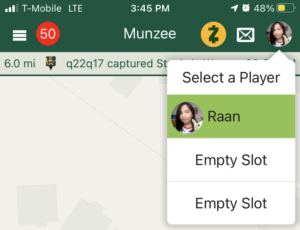
At the time stated above, the Munzee app will no longer support the Multi-User Login (MUL) feature. Our team has gone back and forth on this feature for quite some time, so we feel we owe our players some transparency as to how we came to this decision.

When the game was first introduced almost 11 years ago, the MUL was created for families who played together and only owned 1 device. Over the years devices for multiple family members have become more common, and although we understand the convenience the MUL has been more trouble than we would like.

Our evaluation of the MUL went something like this:

Pros Cons
  • Allow families with multiple Munzee players to easily play on one device
  • Quick access for another player if battery dies or signal is lost
  • Most families with multiple Munzee players are now able to provide a device for each player
  • Players who create fake accounts take advantage of this feature to quickly accumulate points or meet requirements for Clan Wars, badges, etc.
  • Development time is increased as new app features must distinguish between the active account and any other logged-in accounts
  • Testing time is also increased as we must make sure that all app features work even as we quickly switch between 3 different accounts
  • The ability to quickly switch between accounts is quite rare among apps — a unique feature rather than one that is standard

Knowing that the original purpose of the MUL has been outgrown, along with all the other cons listed above, we have decided to remove the MUL from the app.

In light of this change, we encourage players to carry external batteries to keep their main device charged and/or bring extra devices in case issues come up so that they can switch and continue playing — things which many of you are already in the habit of doing.

Otherwise, it just takes a few extra steps to log out and then log in to another account the old-fashioned way.

In Comes More

We understand some will be upset by the decision to remove MUL, but we want to continue to offer a positive Premium Membership experience. So we’re excited to announce that we are in the process of testing out 2 NEW additional features we think all Premium Members will enjoy. Please understand that these new features are a trial/test and we want to gather feedback from players to make sure this is an appropriate addition to the game.

+5 Additional Filter Preset slots +1 Increased Magnet Effectiveness
  • This will bring the total to 10 custom filter presets!
  • Standard munzees will now attract 4 bouncers
  • Landing Pad Destinations will now attract 7 bouncers

We’re always looking to bring more value to Premium Memberships as they help keep our app running. These updates are just the beginning — we’ve got more in the works, so keep an eye out for future announcements!

Munzee on!

March 22, 2022

Use Your PinPoints Before They’re Gone!

Almost three years ago, we started the PinPoints program to give players a way to earn game pieces through gameplay and purchases. Although we’ve enjoyed this opportunity to reward players, certain limitations by third party developers have forced us to shut down the program. Because of this PinPoints will no longer be redeemable after 15:00 MHQ on March 31st.

If you have PinPoints you can read more about these changes below, but we do want to highlight a number of reward opportunities we’ve added over the last three years for the Munzee community:

  • We launched our In-App Store, which allows players to purchase items using Zeds, an in-app currency which are often given as rewards for various gameplay achievements.
  • By rebooting our ZeeOps program, players can earn daily rewards for completing missions, as well as different credits that can be used in the Redeem Store.
  • For special occasions, limited-time credits like the Sham Rocks are earnable via gameplay and can be redeemed for unique seasonal game pieces.
  • Key areas of the game have been revamped such as the NEW Daily Activity Tracker, and Clan Wars, where players are able to earn rewards through gameplay as well.

Ultimately as our team has developed better ways to deliver rewards, it has become unrealistic to rely on third party providers for these tools. We appreciate all of those that have embraced the PinPoints program so we want to be sure that you can make the most of those points while you have them.

How to Make the Most of Your PinPoints

To see past PinPoints transactions on our website visit: https://www.munzee.com/pinpoints/

To see current options to redeem in the store https://store.freezetag.com/pages/pinpoints

  • Earn PinPoints on purchases until 15:00 MHQ on March 28th – PP have a 3 day delivery/hold period on them, so we will deactivate new purchases at that time.
  • Review other items in the Freeze Tag Store to see if there’s anything else you want to redeem using PinPoints.
  • Use discount codes produced by PinPoints starting with “LL” before they are voided permanently April 1st.
  • Refer to our Help Guide article if you need a refresher on how everything works.
  • We know there are some players with large amounts of PinPoints left, so we have added a handful of NEW, higher value items until 15:00 MHQ on March 31st.

We do not anticipate offering PinPoints as part of a loyalty program in the future, so you will need to redeem your PinPoints before the removal date. Please note that we do not have PinPoints stored in the Munzee databases. PinPoints are held by a third-party provider through our Shopify store, so we won’t be able to bring those points back.

We hope you enjoy spending your leftover PinPoints, and stay tuned for more exciting ways to earn rewards in the future!

Munzee on!

March 15, 2022

Secret ZeeOps- Operation: Out Of Time (March 2022)

All caught up with Secret ZeeOps and looking for more? Here’s a new one available in the ZeeOps Hub for the usual cost of 1,500 Zeds. For now, it will be available for purchase until 23:59 MHQ on April 30. If you’ve purchased a Secret ZeeOp, you will be able to complete it and collect rewards even after it is no longer available for purchase.

Can you help us solve a DST-linked mystery? If you complete ALL the missions in Operation: Out Of Time, you’ll receive the snazzy badge below, along with the new M0TH3RB04RD and Father TiM3 Mechz (more info below!) and various other rewards listed in the app!

There are 5 levels. All levels have 3 missions each. Each level ends with more prizes.

We may share this information moving forward with other Operations but possibly not.

NEW Mech Details

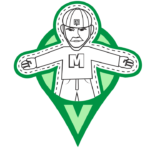
Like the other Munzee Mechz, the M0TH3RB04RD and Father TiM3 are temporary POBs that will remain on the map until they have been captured 5 times. In addition, as a tPOB, upon capture you have the chance to earn 1 Sham Rock Credit.
M0TH3RB04RD Father TiM3
Points Points
  • Deploy: 500
  • Capture: 250
  • CapOn: 100
  • Burnt (5th Cap): 500
  • Deploy: 500
  • Capture: 250
  • CapOn: 100
  • Dizzy (5th Cap): 500
Landing Pads Landing Pads

You can find these parental units checking up on the landing pads above every 6 hours or when captured.

M0TH3RB04RDs and Father TiM3s will be available for multi-capture. That means players can capture M0TH3RB04RDs and Father TiM3s on their own munzees, any previously captured munzees, and more than once if the same M0TH3RB04RD or Father TiM3 visits you. M0TH3RB04RDs and Father TiM3s are non-blastable. They will be attracted to both Physical Magnets and Virtual Magnets. You can access M0TH3RB04RDs and Father TiM3s by turning on your “All Expiring Specials” filter.

When a M0TH3RB04RD is captured, it will scatter up to 3 C00K13S. Similarly, when a Father TiM3 is captured, it will scatter up to 3 Hourglasses.

C00K13 Hourglass
Points Points
  • Capture: 50
  • CapOn: 25-30
  • Capture: 50
  • CapOn: 25-30

These scatters will be visible to any player and will be deployed on the Mech owner’s account. This means that unlike Air Mystery Feathers/Boulders, there are CapOn points for the owner! They expire after 120 minutes and have a capture radius of 300 feet. These scatters will NOT count for deploy streaks, ZeeOps, or clan activity since they are passive deploys.

Badges

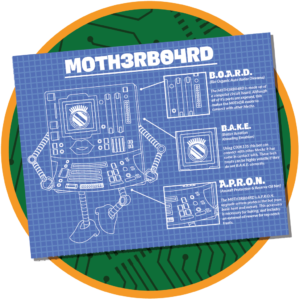
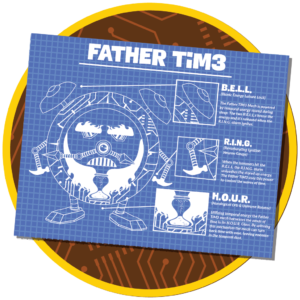
As with other Munzee Mechz, the badge for deploying the M0TH3RB04RD and Father TiM3 depicts the Blueprints, and are shown below:

There are also badges for capturing a M0TH3RB04RD and capturing a Father TiM3. Since there’s only one badge in these lines, we’ll keep them a secret for now.

On behalf of MHQ, we thank you for your continued service.

This message will self destruct in 3… 2… 1…

March 2, 2022

Updates to the Daily Activity Tracker

At the end of January, we released an update featuring a new Daily Activity Tracker screen. We’ve always planned to include rewards for completing streaks up to certain days, so we’re happy to announce that that feature is in this latest update, along with some other improvements suggested by you, the players!

If you’re interested, check to see if you’ve received Build #857 over-the-air — to find out what version you are currently on, look at the bottom of the [Help & Info] –> [About Us] page inside the app. If you have not received the latest automatic update, please restart the app. It may take a few tries depending on your Wi-fi/data connection.

NEW Rewards!

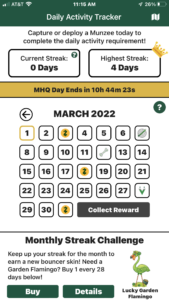
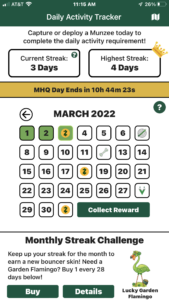
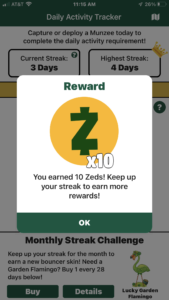
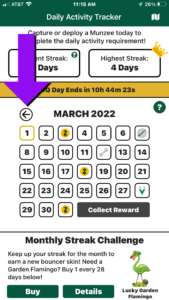
As you can see in the screenshots below, we’ve updated the calendar on the Daily Activity Tracker so that some rewards are sprinkled throughout the month.

After Day 28, the cycle of prizes starts over again — so that’s why in the screenshots above, you can see a Zed icon again on March 31st.

There are a few important things to note:

  1. You MUST tap the green [Collect Reward] button in the bottom-right corner of the calendar on the day the reward is available for it to be added to your account. If it is not collected before the next MHQ day, the calendar will update and you will not be able to collect the reward.
  2. If your streak is broken at any point, it will cause the cycle to reset, and push back the rewards for all subsequent days accordingly.
  3. As noted in our previous DAT blog, it may take a minute to update your streak information after a capture or deploy is completed. This means that if you tap the [Collect Reward] button while your captures or deploys are still processing, you may see the text on the button change to “Verifying…” like in the screenshot on the right. If you see this, you can stay on the screen and wait for all the processing to complete, or just try again later.

Other Improvements

Many players requested that we add the ability to scroll the calendar back so they can more easily see their past progress. We’ve added a small arrow button to the top-left corner of the calendar so you can scroll back to the previous month, and similarly, a small arrow button to the top-right corner of the calendar to return to the current month.

We hope this update brings some changes you were looking forward to, or, at the very least, runs smoothly for you! If you find that you are experiencing any issues, please let us know at support@munzee.com!

Munzee on!

February 21, 2022

Another Update to Streaks

Last week, we did a quick announcement on our social media pages (FB|TWTR|IG) about a change we’d made regarding Universals and capture streaks. However, from that post we’ve received reports of additional inconsistencies from you, the players. So, in the interest of clarity and simplicity moving forward, we are making some more changes, which we’ll go into detail about below.

But before we get into all that, we’d like to put your mind at ease with some very important points:

  • The changes described below will be effective as of Tuesday, February 22nd.
  • The changes will only apply to activity moving forward from that date — so past streak progress will not be affected.
  • Streaks affected by the change we made on February 14th will be restored, to put everyone on equal footing for the upcoming update. However, that does not mean we’ve completely changed our minds about Universals, as you’ll see below.

Passive Activity

We’ve always stated in our blog posts that passive deploys, which are deploys automatically made by the app on your account, do not count for deploy streaks. A recent example of this are the Flamingo Feather scatters — the intent behind those is to increase the point potential for you, the deployer — not to count for streaks, since they required no action from you.

Similarly, we consider the tPOBs deployed as the final stage of Animal Evolutions and 2nd/3rd/nth Mech forms, such as the MUMM33, to be passive deploys, since the app automatically deploys these without you, the deployer, triggering them. However, it was brought to our attention that they have been counting for deploy streaks, which was never our intention. So, effective Feb 22nd, all such automatically deployed bouncers will no longer count towards deploy streaks.

Said another way, any deploy triggered by an action you’ve done will count. Of course, all the regular manual deploys you’d expect will count, but also deploys triggered by a purchase, as is often the case with any new Mechz we sell.

Location-less Game Pieces

The intent behind Socials, Personals, and Universals was to encourage Munzee players to socialize and build connections with others who share the same hobby. As it takes some effort to obtain and deploy these game pieces, they will count towards deploy streaks. However, if they are redeployed (especially in the case of Personals), the date that they count for will change, since the deploy on them can only count once. So, it’s best to not rely on them for deploy streaks.

On the other hand, captures of these pieces will not count towards capture streaks. As Socials and Universals are location-less, and Personals can be deployed up to 10 times a day, this makes the effort to capture them much lower than other game pieces.

We hope this post clears up any confusion regarding streaks, and that you are prepared for tomorrow’s update.

Munzee on!

February 14, 2022

V-Mailbox Guide

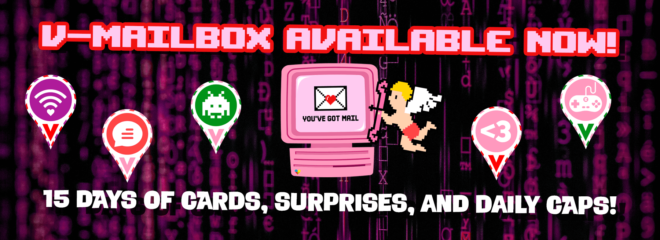
As with the past Card Collector Clubs/Mailboxes (Holiday | Valentines | 10th Birthday), we’ll post each day at 00:00 MHQ on our social media channels (FB | TWTR | IG) whenever we’ve got something special waiting for you in your V-Mailbox. We’ll also keep this blog post updated as well!

V-Mailbox Greeting Cards

Special Bonus Days

Don’t forget the Schedules we had posted in advance! The events mentioned there will be listed below as the rest of the month unfolds.

Munzee on!

February 10, 2022

Loveable Mini Mechz to Collect + NEW Badge Lines!

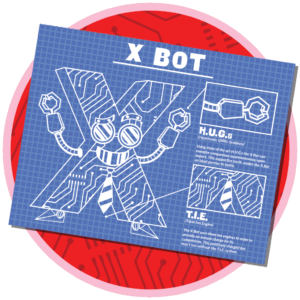
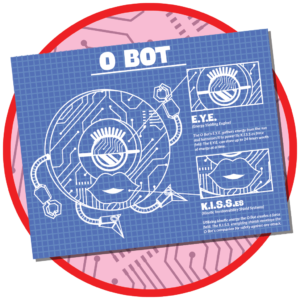
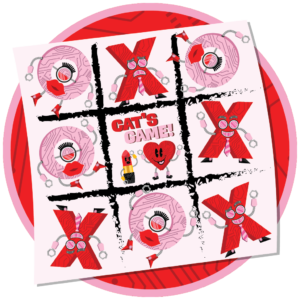
Can you believe there was a time when all you could use your Cogs on were Spyderbots? With the increasing popularity of Daily ZeeOps, we’ve tried to design new tPOBs to keep the map more varied and fun for everyone! This month, we’ve released new Mechz in the MunzPak and the V-Mailbox, but what if you just want a new Mech without all of the extras? We’ve got two Valentine-themed options for you… Please welcome X Bot and O Bot!

NEW Mech Details

X Bots and O Bots are temporary POBs that will remain on the map until they have been captured 5 times. The X Bot is available at the Freeze Tag Store HERE. The O Bot will be available in the In-App Store! When you purchase a X Bot or O Bot, you will receive a fully-built X Bot or O Bot that auto-deploys. You will also receive the Blueprint to rebuild it when you have earned enough Cogs in the future. These Mechs will be available to purchase until 23:59 MHQ on Monday, February 28th.

Points

  • Deploy: 500
  • Capture: 250
  • CapOn: 100
  • Xhaust (5th Cap): 500

You can find these alphabetical androids making their mark at the following landing pads every 6 hours or when captured:

X Bots and O Bots will be available for multi-capture. That means players can capture X Bots and O Bots on their own munzees, any previously captured munzees, and more than once if the same X Bot or O Bot visits you. X Bots and O Bots are non-blastable. They will be attracted to both Physical Magnets and Virtual Magnets. You can access X Bots and O Bots by turning on your “All Expiring Specials” filter.

When an X Bot is captured, it will scatter up to 3 Heart ThRobots. Similarly, when an O Bot is captured, it will scatter up to 3 Rouge Bots.

These will be visible to any player and will be deployed on the X Bot or O Bot owner’s account. This means that unlike Feathers/Boulders, there are CapOn rewards for the owner! They expire after 120 minutes, have a capture radius of 300 feet, and you’ll be able to use Rover Treats to capture them as well. These scatters will NOT count for deploy streaks, ZeeOps, or clan activity since they are passive deploys.

The rewards for Heart ThRobots and Rouge Bots are as follows:

  • Capture: 50 points
  • CapOn: 25 points

Badges

Deploying an X Bot or an O Bot will earn you the corresponding Blueprint badge. You can see these badges below.

There is also a line of badges that you can earn for X Bot and O Bot captures! You can see the first badge in this line below.

Lastly, we’ve also created NEW badge lines for overall Mech captures and deploys. You can see the first badges in these lines below:

As these badge lines are retroactive, you may have already met the requirements for some of the badges, and should see them on your account soon! If not, please wait a few days as our system catches up with awarding these new badges to everyone who has earned them, before contacting support.

We hope you show some love to these new mechz!

Munzee on!

*Red Colored Virtuals include:

  • Virtual Bittersweet
  • Virtual Red Orange
  • Virtual Scarlet
  • Virtual Red
  • Virtual Brick Red
  • Virtual Mahogany

**Pink Colored Virtuals include:

  • Virtual Melon
  • Virtual Pink
  • Virtual Carnation Pink
  • Virtual Mauvelous
  • Virtual Salmon
  • Virtual Tickle Me Pink

February 7, 2022

V-Mailbox Schedules

One especially good thing we learned from Sir Prize Santa is that knowing when the Double Point Weekends and Special Themed Scatter Events are is most helpful in deciding whether or not the mailbox is right for you. So, without further ado, here are the schedules for the V-Mailbox!

Double Point Weekends (DPWs)

Week Tier Dates Double Points ON
1 #2 & #3 Thursday, Feb 17 at 00:01 MHQ to Friday, Feb 18 at 23:59 MHQ Jewels
1 #3 Saturday, Feb 19 at 00:01 MHQ to Sunday, Feb 20 at 23:59 MHQ Zodiacs + Zodiac scatters
2 #2 & #3 Thursday, Feb 24 at 00:01 MHQ to Friday, Feb 25 at 23:59 MHQ Gaming + Gaming scatters
2 ALL Saturday, Feb 26 at 00:01 MHQ to Sunday, Feb 27 at 23:59 MHQ Greeting Cards

Special Themed Scatter Events

When you cap the V-Mailbox, up to 10 themed scatters will be deployed nearby. They expire 36 hours after they are deployed, to hopefully give you enough time to capture them all! While we’ll reveal the Tiers and Dates to help you plan, we’ll just reveal what will be scattering for the first week:

Week Tier Dates Special Themed Scatter
1 #3 Friday, Feb 18 at 00:01 MHQ to 23:59 MHQ Candy Crunch
2 #2 & #3 Friday, Feb 25 at 00:01 MHQ to 23:59 MHQ ?

We hope you’re looking forward to a fun-filled February! If you haven’t joined the VCCC yet and would like to do so now, click HERE!

Munzee on!

January 31, 2022

NEW In-App Daily Activity Tracker!

One of the first things you learn when you’re just getting into Munzee is that the most impressive accomplishments are related to streaks — meaning either capping, deploying, or both each day, for as long as you can! While capping each day can be difficult for those who live in munzee-sparse areas, and on the other side of the coin, deploying each day can be difficult for those who live in munzee-dense areas, the main difficulty most players have is making it part of their daily routine.

In the past, players have relied on simpler solutions, such as setting alarms on their devices, or more complex solutions, such as using third-party tools, to remind them to cap and/or deploy for the day. While there’s nothing wrong with using those solutions, we’ve always wanted to have a built-in option for you to use as well!

If you’re interested, check to see if you’ve received Build #834 over-the-air — to find out what version you are currently on, look at the bottom of the [Help & Info] –> [About Us] page inside the app. If you have not received the latest automatic update, please restart the app. It may take a few tries depending on your Wi-fi/data connection.

Daily Activity Tracker

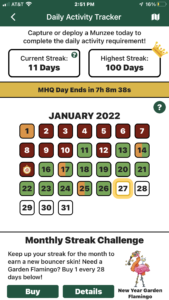
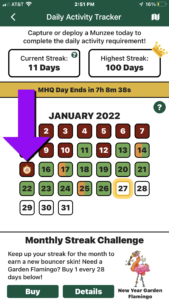
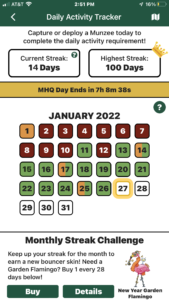
The Daily Activity Tracker allows you to view your captures and deploys for each day of the month to help track your streaks. It will appear before the map the first time the app is launched each day. Afterwards, you can access it by going to your Profile –> [Stats] –> [Daily Activity Tracker].

The Current and Highest Streak counters at the top track how many days in a row you have either captured or deployed a Munzee.

The calendar in the middle is the main attraction, but we’ll get into more detail on it below!

The Monthly Streak Challenge at the bottom features the unique Flamingo skin that can be earned by keeping up your activity streak each month. Make sure all of the boxes for the month are colored orange or green to qualify for the skin reward!


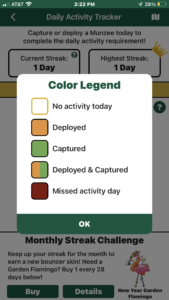
Colors on the calendar are color coded to help you quickly see which activity happened on which days:

  • If it’s flashing yellow, make sure to complete your activity for the day!
  • If you’re aiming for the Deploy Streak Badges, make sure all the boxes are orange!
  • If you’re aiming for the Capture Streak Badges, make sure all the boxes are green!
  • If you’re aiming for the Capture & Deploy Streak Badges, make sure all the boxes are split between orange and green!
  • Make sure to avoid any red missed days that will break your streaks!

Please note that it may take a minute to update your streak information after a capture or deploy is completed.


Premium Feature

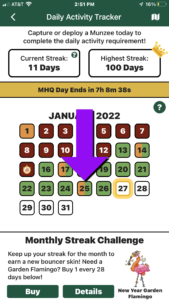
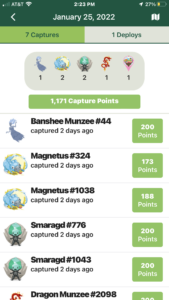
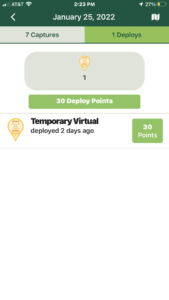
Premium members can tap on a specific date to see a summary of the Munzees that were captured and/or deployed on that day. The tabs at the top will allow you to switch between the displays.

  • Please note that the caps/deploys listed will only show types that count towards streaks, so it won’t show caps of Socials or Universals, and it also won’t show passive deploys (such as deploys of Flamingo Feathers)

This should also make it easier to track down certain Munzees that need to be moved around, like Mailboxes.

If you’re not a member, sign up for a free trial in the app to check it out!


Capture Mulligan Integration

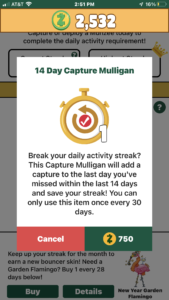
If you break your capture streak, a Capture Mulligan icon will appear on the missed day if there is one available for you to use.

  • Note that it might not always appear on a red day. It’s possible that it may appear on an orange day if a capture was missed.
  • If the missed day is not visible on the calendar anymore because the next month has already started, you can always purchase the Capture Mulligans directly from the In-App Store

Tap on the icon to see which Capture Mulligan is offered: 1, 7, or 14 Day.

After purchasing, it will add a capture to the day that was missed and update your current streak counter at the top.


We hope this update brings some changes you were looking forward to, or, at the very least, runs smoothly for you! If you find that you are experiencing any issues, please let us know at support@munzee.com!

Munzee on!