Posts Tagged ‘family fun’

March 27, 2019

Blast From the Past 90s Tags Are Totally Dope!

If you’re wondering why it smells like Teen Spirit here at MHQ, it’s because our Blast From The Past personal tags series is reaching its final stretch with our 90s tag dropping in the Freeze Tag Online Store today at 15:00 MHQ time! The last four weeks have brought us the 50s, 60s70s, and 80s Munzee Personal tags, and our penultimate tag is ready to get crunk!

One might say the 90s personal tag is the bomb. (And that person would be correct.) 

Are you considering missing this personal tags sale? As if! The 90s personal tags will be in the store for exactly one week, available for purchase until Wednesday, April 3 at 15:00 MHQ time. At this point our final tag, the 00s tag, will bump it off the market. To save some cheddar, don’t forget to add your FREE Blast Capture to the cart with any Blast From The Past personal tag purchase.

In order to get the FREE Blast Cap, you’ll need to add both the Blast From The Past personal tag of your choice and a Blast Capture to your cart. No discount code is needed, but the discount will NOT be automatically added until both items are added to the cart. If you plan on buying more than one Blast From The Past tag and want more free Blast Caps, you will need add more to your cart for each tag purchase. Please note that this promo is only applicable to the Blast From The Past tags.

Like all of our personal tags, the 90s tag is made with sublimated images on metal to ensure for durability. You should get crunk about the dopest decade in time, which introduced the world to the glory of Dunkaroos, the Macarena, Beanie Babies, Nintendo 64, fanny packs, gel pens, Tamagotchis, AOL, Discman, Lisa Frank, slap bracelets, Pokemon cards, and pretty much everything that mattered! (Except for Munzee… you’d have to wait until 2011 for that.)

Pick up a tag to relive the freshest decade in time! Honestly the only thing more fly than these tags is this photo of Rob from the 90s!

Back before the baseball cap

Boo ya! And Munzee on!

March 27, 2019

Munzee Mistakes: 20 Capping Tips for New Players

Last week we shared 20 deploy tips brought to you by fellow Munzee players. This week we’re happy to share 20 capping tips also shared by player suggestions. Have any helpful tips that you’d like to share with new players? E-mail us at iloveyou@munzee.com to share your ideas! And be sure to share these blogs with new players, as well as have them scan your referral code.

This article’s theme is capping tips! “Capture,” “Cap,” or “Capping” are all terms we use for earning points from a munzee, which is either done by scanning a QR code on a Physical Munzee or by standing within the appropriate circumference to capture a Virtual Munzee. Remember you can purchase munzees for other players to capture, which will allow you to earn “CapOn” points, in the Freeze Tag Online Store!

Here is what fellow players had to say about capping mistakes, tips, and tricks:

Tip #1: Always read the details of the munzee, including the about screen, history, and even the photos screen. These areas will usually have helpful information about the specific munzee that you’re trying to capture. (dgas71)

Tip #2: Take a black pen with you. It might help if you colour in the large black squares in the QR code if you can’t scan an old munzee! (Appeltje32)

Tip #3: Create a “Munzee bag” with wipes (munzees stick better in clean spots), extra munzees to deploy, water, a charging device, selfie stick, etc. You can carry this bag around with you while capping to always have the essential on hand. (thefoods)

Tip #4: For those living in areas that get a lot of snow, get a selfie stick. Selfie sticks will help you reach those munzees that are four feet away without having to climb through snow banks. It also helps you reach munzees deployed a little to high to reach. (SpiritTree)

Tip #5: In the winter months, invest in either electronic friendly gloves or a cheep pack of styluses to keep you from having to take your gloves off while capping. (Geodude)

Tip #6: Be prepared with water, sunscreen, generics, and referral cards before you set off to cap! (Jellybean88)

Tip #7: When Munzeeing, always remember to “slip, slop, slap” (wear plenty of sunblock) when playing during the daylight hours. You’ll regret it if you don’t and you end up sunburnt. (prmarks1391)

Tip #8: When walking and capping, consider wearing a safety vest. Not only do you look safe, but it will also make it appear as though you belong where you are. This will help it look less suspicious when you are capping random objects. (godspeed1074)

Tip #9: Carry alcohol prep pads with you while capping. They work great to get recently painted-over munzees clean so you can cap them. (TK7464)

Tip #10: If your GPS doesn’t show the position where you are and it isn’t refreshing, start another GPS app such as GPS Status. If that still doesn’t help, kill the app and start again. ( GeoLog81)

Tip #11: Invest in a Premium Membership! It really helps with captures. (newbee)

Tip #12: When capping, deploy a munzee near your car so that you can find it when you are done. Sometimes your munzee nose can lead you further and further away from where you started. (Godspeed1074)

Tip #13: Always carry a backup battery or charger, and make sure your phone is fully charged. (snakelips)

Tip #14: When you intentionally drive to an area to spend time capping Munzees, park near a munzee if possible, but don’t cap it until you are ready to leave. Use that pin to keep track of where you parked your vehicle (especially if you are doing a clean sweep of munzees). Knowing how far you’ve wandered from the munzee you parked near will allow you to estimate how long it will take to get back to your car! (Anitaz)

Tip #15: If you can’t reach a munzee, use the zoom (pinch out) to magnify the image a bit. (thefoods)

Tip #16: Hold down on the globe to realign the map so north is up! (danielle41101)

Tip #17: Use the satellite view on the map! It can give hints as to what light pole, sign, fence post. etc. the munzee is deployed at. This is very helpful if there are only vague hints provided. (Buckeyecacher111)

Tip #18: If you don’t see the munzee right at the listed coordinates, check some other locations nearby. Perhaps the hint is incorrect; i.e. the munzee is really on a green box, but the hint said “LP” for lamp post instead. There may be several of the hint all clustered together, so be sure to check them all. (5Star)

Tip #19: Remember to refresh the map if you scan any Elemental munzees. This is not the end of the fun! A new bonuses munzee has just appeared in your area! (Lumen)

Tip #20: Plan road trips so you can munzees along the highway. This makes the trip go a lot faster! However, don’t drive and cap! (Bowlr)

For more Munzee Tips, follow us on Facebook, Twitter, and Instagram and keep a lookout on the updates we’re doing on the Munzee Help Manual. A big thanks goes out to all players who shared their tips! Munzee may be complex, but there are always players ready to help decipher everyone’s favorite real world scavenger hunt.

Munzee on!

March 26, 2019

Washington Iconic Location Munzees Join the Map!

We’re excited to announce the latest Tourism Munzee destination and welcome the Washington Iconic Locations virtual munzees to the map! Not to be confused with Washington D.C. (which is more than 2,500 miles away), Washington state earns the distinction of being the only state to be named after a United States president, which is why this lovely wigged man is on the icon.

The Washington Iconic Locations join other Tourism Munzees, such as Australia, Great BritainFlorida, California, and more. You can access these special virtual munzees by turning on your Tourism filter!

The Washington Iconic Location virtuals are deployed by an MHQ account based on a database of historical markers that player Jellybean88 helped us put together! Players will earn 50 points when they capture the latest Tourism Munzee in the state that also earns the distinction of housing billionaire Bill Gates, as well as the largest apple production in the country.

Like other Historical and Iconic Location Munzees, these new Tourism munzees will not be blastable. They also will not be accompanied by a distinct set of badges, as captures will instead count towards the Tourism line of badges.

Our Tourism badges are primarily linked to the Historic and Iconic Munzees from different countries around the world, as well as states in the U.S. There are six badges in total, with plans to release more Historic and Iconic Location Munzees in the future, so stay tuned! If you ever come across any Iconic Location or Historic Munzees deployed in the wrong place, please contact support with the name/URL of the munzee and correct information.

Follow us on Facebook, Instagram, and Twitter, to let us know your progress!

Munzee on!

March 25, 2019

March GOTM Winners Revealed!

Our Garden of the Month nominations have been steadily streaming in since we announced the start of the program earlier this year, as our February GOTM nominations allowed us to award two more players for their Virtual Garden organizing skills. The GOTM recognition is meant to honor a number of our exceptional Virtual Garden builders who have aided in creating some of our favorite gardens in the game. Winning organizers, as well as all players who deployed in the winning gardens, will receive a special GOTM badge.

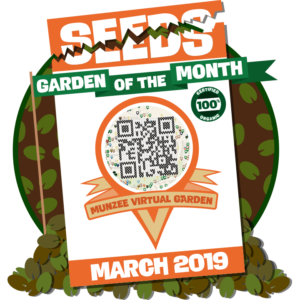
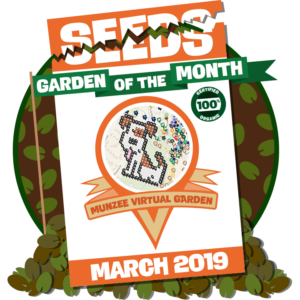
This month, we’re happy to award the QR Code Map, organized by c-bn, and the Huntfield Heights Dog Park Garden, organized by WiseOldWizard, as our Gardens of the Month March winners! The March GOTM gardens appear as follows:

The QR Code Map organized by c-bn in Bonn, Germany:

What’s Munzee all about? QR codes! It’s only fitting to award the garden that represents the pith of the game. 

The Huntfield Heights Dog Park Garden organized by WiseOldWizard in Huntfield Heights, Australia:

This Garden doesn’t need an explanation, as dogs truly are man’s best friend. Plus, Rover insisted we select it!

All players who deployed in the respective winning gardens will receive the following special badges!

Rules and Regulations 

Do you know a garden deserving of the title of April GOTM? We’re asking for players to submit already created gardens for the chance to win any of our upcoming Garden(s) of the Month! Just be sure to follow the rules!

Rules for GOTM nominations:

  1. Garden must feature non-licensed character designs.
  2. The garden must feature a Garden Places Pin.
  3. The garden must be built using a publicly available spreadsheet which we will ask to be locked after being 100% deployed.
  4. We’re asking for ongoing nominations and we will release the winners throughout the year.

E-mail us at iloveyou@munzee.com to nominate yourself or another qualified player for GOTM! We take all former nominations into consideration for upcoming months. Just be sure your garden follows the nomination rules in order to be considered eligible!

If you need help deploying in a Virtual Garden, you can check out this step-by-step tutorial that will making deploying in a garden easy no matter how long you’ve been playing. To fill in the gardens, make sure to stock up on Virtuals and Color Credits in the Freeze Tag Online Store. Our Virtual collection includes Temporary Virtuals, Virtual Trail Munzee Credits (multiple), and the Virtual Trail Munzee Credit (single).

Congrats to c-bn and WiseOldWizard and all players who deployed in their winning gardens for earning March GOTM! Thank you to all who take the time and patience to organize gardens and to all who deploy! We love reviewing the virtual landscapes everyone creates!

Munzee on!

March 22, 2019

Flat Friends April 2019 Schedule Is Here!

Are you ready for April showers (and May flowers)?! Our April Flat Friends schedule is here, with another opportunity for double points this month! All Flat Hammocks will be double points on the 21st for Hammock’s birthday! It looks like our Flat Friends have been extra generous this month…

Flat Lou

Flat Hammock

  • Monday, April 1st at 00:01 MHQ time through Friday, April 5th at 23:59 MHQ time
  • Monday, April 8th at 00:01 MHQ time through Friday, April 12th at 23:59 MHQ time
  • Monday, April 15th at 00:01 MHQ time through Friday, April 19th at 23:59 MHQ time
  • Sunday, April 21st at 00:01 MHQ time through Friday, April 26th at 23:59 MHQ time
  • Monday, April 29th at 00:01 MHQ time through Tuesday, April 30th at 23:59 MHQ time

Flat Rob

  • Thursday, April 4th at 00:01 MHQ time through Sunday, April 7th at 23:59 MHQ time
  • Tuesday, April 16th at 00:01 MHQ time through Tuesday, April 23rd at 23:59 MHQ time
  • Saturday, April 27th at 00:01 MHQ time through Sunday, April 28th at 23:59 MHQ time

Flat Matt

  • Monday, April 1st at 00:01 MHQ time through Wednesday, April 3rd at 23:59 MHQ time
  • Friday, April 5th at 00:01 MHQ time through Saturday, April 6th at 23:59 MHQ time
  • Tuesday, April 9th at 00:01 MHQ time until 23:59 MHQ time
  • Friday, April 12th at 00:01 MHQ time through Wednesday, April 17th at 23:59 MHQ time
  • Friday, April 19th at 00:01 MHQ time through Sunday, April 21st at 23:59 MHQ time
  • Friday, April 26th at 00:01 MHQ time through Tuesday, April 30th at 23:59 MHQ time


March 22, 2019

Personal Munzee Gameplay Update

Happy Friday! Today we’re announcing a slight update to how personal munzees operate. Previously the owners of a personal munzee were able to deploy up to 3 times per day in new locations by scanning the munzee in the location they wanted to deploy it, leaving the munzee open for capture up to one mile away. You are now able to deploy your personal munzee up to 10 times in a day!

Deploying a personal munzee multiple times in a day allows for players to deploy at events and then walk around the area while still being able to have their personal munzee captured. As a reminder, personal munzees are exempt from proximity rules, so there can be deployed anywhere you wish up to 10 times in a day now.

You can pick up your own personal munzees from the Freeze Tag Online Store!

Munzee on!

March 21, 2019

Munzee Mistakes: 20 Deploy Tips For New Players!

As followers of our Facebook, Twitter, and Instagram know, we have been sharing Munzee Tips to help ease new player transitions into everyone’s favorite real world scavenger hunt. Along with our social media tips, we decided to release blogs for the next several weeks containing different categories of gameplay tips as suggested by players. Feel free to share these posts with new referrals (and don’t forget to share your referral code)! If you are new to the game and checking out our blog for the first time, welcome to Munzee!

This article’s theme is Deploy tips! Deploying is the term we use when you put out your own munzees for others to capture. Remember you can purchase munzees to deploy in the Freeze Tag Online Store!

Read what fellow players had to say about how to best deploy your munzees:

Deploy Tips and Tricks

Tip #1: When deploying a physical Munzee, first deploy it, then stick it to the object. So if you can’t place the Munzee at your location, then you can walk to another position without wasting a Munzee. (Felixbongers)

Tip #2: Always carry “greenies” (generic stickers) in your pocket! You never know when you need to replace or find that PERFECT spot. (Thefoods)

Tip #3: When deploying virtuals from a desktop computer, after you deploy, look at the location to make sure you did not deploy too close to another Munzee. (This is especially helpful along roadways.) Move your munzee to allow enough distance between the two for capping. (Calvertcachers)

Tip #4: Remember to write the type of special Munzee on the back when cutting them into individual QR codes, particularly MunzPak ones. Also leave a slight margin around the QR code so that it scans easily (Nuttynan)

Tip #5: When deploying physicals, don’t place them too high, since not all of us are tall and not all of us have selfie sticks! If you want CapOns, short people have to be able to reach them! (BonnieB1)

Tip #6: Think about convenient places where you can deploy your munzees, because of jumping myths/pouches/specials. Choose a place that you and other players can come back to many times in the day and the night, in summer and winter. (BituX)

Tip #7: When deploying in winter, remember foliage will grow in the spring! (Penfold49)

Tip #8: If deploying physicals close to houses or schools, etc. place the Munzee so the capper doesn’t have to point their phone towards the building to prevent them causing suspicion by appearing to take photos of private property. (Tonydev)

Tip #9: Deploy lots of greenies in areas you frequent often… home, work, and convenient points along your regular routes. A high density of “greenies” can attract Mythologicals, so you won’t be driving out of your way to get them. (BAJAclan)

Tip #10: Before deploying, hit the locate button as you stand where you want to deploy. This will get the pin right where you want it. Write in the notes where the munzee is located so others cap it and not mark it as unable to locate. (Kcsilvia)

Tip #11: In the Northern Hemisphere, put your stickers on the north side of an object whenever possible. This will minimize the sun exposure, and they will last longer. This goes for the south in the Southern Hemisphere. (Sabaharr)

Tip #12: Deploy some virtuals nearby and some far away. Spread them out, and help build locally. (levesund)

Tip #13: Build your area quickly to attract bouncing specials…. Deploy, deploy, deploy! (Monrose)

Tip #14: Deploying clusters of one type is very helpful for folks doing ZeeOps & Clan Wars (and will get you caps!). Jewel fields, weapon armories, Prize Wheel clusters, Zodiac groups, Elemental Mystery pits, etc. (denali0407)

Tip #15: When you name your deploys, always use at least three characters to be able to search them later on, and avoid naming several of your deploys identically, for the same reason. (tcguru)

Tip #16: When deploying a physical Destination Munzee, first convert your generic/printed Munzee to the respective destination type at home at the computer (don’t forget to label it on the back). So when you are going to deploy it in the wild, you will get a message in case there is not enough space for it. (halizwein)

Tip #17: Grow your local area with many different types of munzees for bouncers to land on. (McAdies)

Tip #18: Help other players, especially travelers, by deploying virtuals with information about places. For example, restaurants offering free wifi or interesting museums or cool stores. (MariaBr)

Tip #19: When you deploy in a new area, look to see what types of munzees the locals have been deploying in that area. (Violetblonde)

Tip #20: When you deploy a lot of physicals and/or a garden in a heavy traffic area, put some sort of sign up so common folk can download app and see what they normally would be missing. (Wabazz)

We’re also beginning to dust off the Munzee Help Manual, where you can find these Tips and Tricks. To share your Munzee Tip, connect with us on social media or e-mail iloveyou@munzee.com.

A big thank you to everyone in the Munzee community who has shared their tips thus far! New players, rest assured that Munzee is a social game, and there are many knowledgeable players waiting to help you out!

Munzee on!

March 21, 2019

California 8th Birthday Celebration Dates!

We’re giving you plenty of time to mark your calendars and book your flights, because we’re announcing the dates for the Munzee 8th Birthday California celebration earlier than last year! Hosted by members of the Freeze Tag office, the 8th birthday celebration of everyone’s favorite real world scavenger hunt will take place on Saturday, July 20 in Orange County, California.

Munzee California birthday bash 2018

Staff from both the California and Texas offices will be in attendance for this birthday bash! You can count on Munzee, WallaBee, Eventzee, and ZeeTours activities and more!

Stay tuned for our announcement of the official Birthday Event Packages in the near future. Be sure to get this date on the calendar so we can celebrate Munzee together! And keep your eye out on the event calendar page for updates regarding event details. We’ll be updating you with more information as soon as we can share it!

We hope to see you there!

Munzee on!

March 20, 2019

Get Your Blast From The Past 80s Tags!

You’ll be saying “gag me with a spoon” if you miss the Blast From the Past 80s tag sale, starting today at 15:00 MHQ time! Our latest tag in the Blast From the Past Munzee Personal tags collection will be in the store all week for your buying pleasure.

Relive the 80s with our Blast From The Past 80s Tags

Don’t forget to add your FREE Blast Capture to the cart with any Blast From The Past personal tag purchase. In order to get the FREE Blast Cap, you’ll need to add both the Blast From The Past personal tag of your choice and a Blast Capture to your cart. No discount code is needed, but the discount will NOT be automatically added until both items are added to the cart. If you plan on buying more than one Blast From The Past tag and want more free Blast Caps, you will need add more to your cart for each tag purchase. Please note that this promo is only applicable to the Blast From The Past tags.

Each week for the past three weeks we have been launching a new Blast From The Past personal tag, revealing our 50s, 60s, and 70s, each of which enjoyed a one week stay in the Freeze Tag Online Store. This week is dedicated to the righteous and radical decade where phones were still on cords and the world embraced Madonna, George Michael, Pac-Man, Nintendo, mixtapes, Walkmans, slap bracelets, skip-it’s, Rainbow Brite, and so much more!

All tags are made with sublimated images on metal to ensure for durability. We know you won’t want to miss this choice tag.

Remember that we will be retiring the current tag when the next tag hits the market, so you have until 15:00 MHQ time on Wednesday, March 27 to pick up your 80s tag before the 90s tag bumps it off the market.

It’s time to play “I Wanna Dance With Somebody” by Whitney Houston, and Munzee on!

March 19, 2019

New Generic Grab Bags for Sale!

Tomorrow marks the first day of spring at MHQ, which has us feeling particularly warm. We decided to celebrate by putting $5 Grab Bags featuring our new generic designs in the Freeze Tag Online Store starting today at 15:00 MHQ time!

You’ll get over $5 worth of generic munzees in each Grab Bag, including the existing mini urban and urban camo designs, as well as some brand new designs featuring a variety of different themes! Each Grab Bag will include a random selection, so you don’t know which design you’ll get. The Grab Bags will remain in the store until we sell out, so be sure to shop now to avoid missing out!

Help us celebrate the spring (or welcome the fall if you’re around the world) by picking up a bag today!

Melt the ice, and Munzee on!