Posts Tagged ‘virtual’

October 25, 2022

Bee-Ball Bouncers for Sports Fans!

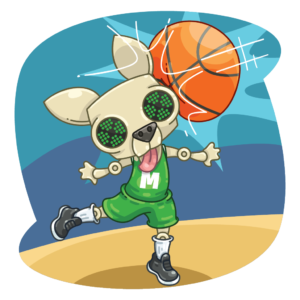
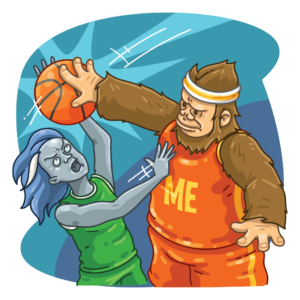
Basketball season officially kicked off last week, so if all of the Halloween-themed releases aren’t your thing, perhaps you’ll enjoy shooting some some Bee-Ball with your favorite Freeze Tag Mascot!

Bee-Ball Bouncer Details

The Bee-Ball Bouncers are temporary POBs that will remain on the map until 23:59 MHQ on December 31, 2022 — when it will be automatically archived on your account. You may recall that this is similar to the Baby Animals, or most recently, the Mad Hatter Garden Gnome.

You can choose between the Munzee Mascot or the WallaBee Mascot as you’ll see below. If you’re interested in scouting a single player, both, or even wish to form a whole team, you can do so HERE!

Munzee Mascot WallaBee Mascot
Points Points
  • Deploy: 500
  • Capture: 250
  • CapOn: 150
  • Deploy: 500
  • Capture: 250
  • CapOn: 150
Additional Info Additional Info
  • Available for multi-capture
  • Non-blastable
  • Attracted to both Physical Magnets and Virtual Magnets
  • Filters: “All Limited Edition Specials” and “All Expiring Specials”
  • Available for multi-capture
  • Non-blastable
  • Attracted to both Physical Magnets and Virtual Magnets
  • Filters: “All Limited Edition Specials” and “All Expiring Specials”

You can find these costumed teammates racing to the following landing pads every 6 hours or when captured:

Additionally, both Bee-Ball Bouncers will scatter up to 3 NEW Bee-Balls nearby when they are captured!

Bee-Ball
Points
  • Capture: 50 points
  • CapOn: 25 points

These scatters will be visible to any player and will be deployed on the Bee-Ball Bouncer owner’s account. This means that unlike Air Mystery Feathers/Boulders, there are CapOn points for the owner! They expire after 120 minutes and have a capture radius of 300 feet. These scatters will NOT count for deploy streaks, ZeeOps, or clan activity since they are passive deploys.

Badges

There are deploy badges for each Bee-Ball Bouncer, which you can see below.

There are also 6 capture badges associated with these bouncers: 3 are based on overall Mascot captures, and the remaining 3 are based on overall Bee-Ball captures. Make sure to cap as many as you can to progress through both badge lines!

We hope you enjoy seeing these masked athletes on the map!

Munzee on!

October 22, 2022

October 2022 GOTM Winners

We began October finishing the last 2 days of our Around ZEE World Mailbox. In the middle of the week, we started our first ZEE-Dayz of the month, this time featuring Flat Friends and Flat Objects! Then on Friday we kicked off the first of our Halloween-themed releases, the Candy Crypt MOBs and Pumpkoins! On Saturday, Mari, Mick, and Tamara attended the Southern California October Munzee Monthly Event, where they got to comfortably catch up with players and take advantage of the double points period!

The next week was Rob’s turn to attend events — he was able to attend all 6 of the SC Munzee Jubilee 2022 events, even posting a quick video to check in! As promised, we had our second ZEE-Dayz during this time, featuring Greeting Cards since they are popular choices to deploy at events. We also released some new Halloween cards, and brought back some old designs from last year. The next day, we released the Count Calcula Mech, available for Pumpkoins, and more artifacts for the Candy Crypt MOBs!

This past week, we welcomed our new Queen Munzee, humbird7, and celebrated by deploying 100 Hummingbird tPOBs on her account! We also put out info on a Christmas Party Add-On for December Events, and had a successful app update featuring potential GPS fixes and In-App Map Links. Just yesterday, we went back into Halloween mode with NEW Myth SkeleSkins.

We are now happy to announce the winners of the October Gardens of the Month (GOTM)! The badges will be awarded by early November, but we couldn’t wait to share the winners we’ve chosen!

October GOTM

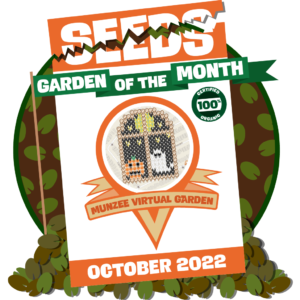
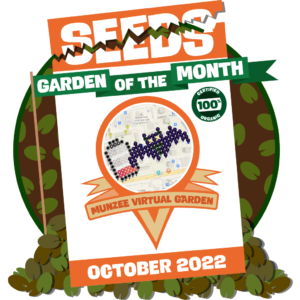
This month, as you’ve probably guessed, we’ve chosen gardens that bring the spirit of Halloween to the map! Remember that all winning GOTM organizers and all players who deployed in the winning gardens will be awarded special badges for their contribution to growing the map. This month we’re happy to award the Halloween in Ottawa garden, designed by Jeffeth, and the Hungry Bat ? Terry ? garden, designed by Rikitan, as our winning October GOTM! The gardens appear as follows:

Halloween in Ottawa by Jeffeth in Ottawa, ON, Canada

We love the scene Jeffeth designed to fit within his signature window frame! A Jack-o’-lantern and ghost lit from behind by an eerie full moon!

Here’s a note from the player who designed this garden:

I am excited for Fall, and for Halloween next month! I am also excited to see what Munzee has planned! This is my final window in my seasonal set here in Ottawa..spoooooky lol

We hope Jeffeth has been enjoying the Halloween-themed releases we mentioned earlier in this post, and that he’s looking forward to what we have planned for the rest of the month! If the design of this garden looks familiar, we previously chose his Christmas in Ottawa garden as one of last December’s GOTM! We thought it made the perfect partner to the other winner, as you’ll see below:

Hungry Bat ? Terry ? by Rikitan in Bratislava, Slovakia

Rikitan’s recommendation of placing Void Mysteries with Virtual Colors in a garden to catch the scatters is a great strategy that many garden designers employ. What other types do you like pairing with Virtual Colors?

Here’s a note from the player who designed this garden:

I wanted to create space (pun intended) for new species of virtual munzees – Void mysteries. They go well together with colored virtuals – for catching the scatters. Regarding design – combination of cute & dark always works well, so I went for a bat. For extra fun & story factor, I combine it with low battery and named whole thing “Hungry Bat Terry / Hungry battery”. You know, when you play Munzee out in winter season, your cell phone battery is exhausted very quickly!

We loved the punny name and design that Rikitan came up with! It’s simple but effective, fitting in perfectly with the Halloween theme but also making the garden unique and relatable — our devices do have to work harder when the weather is extremely cold!

All players who deployed in the respective winning gardens will receive the following special badges:

Rules for GOTM nominations:

  1. Garden must feature non-licensed character designs.
  2. The garden must feature a Garden Places Pin.
  3. The garden must be built using a publicly available spreadsheet which we will ask to be locked after being 100% deployed.
  4. We’re asking for ongoing nominations and we will release the winners throughout the year.

Based on your feedback, we’ve created a Google Form where you can submit GOTM nominations — here’s the link: https://forms.gle/SjUQeRxdi5FT81pCA

We’ll still check the iloveyou@munzee.com inbox for stragglers, but please try to send your submissions to this new Google Form instead. Keep in mind that we take all former nominations into consideration for upcoming months. Just be sure your garden follows the nomination rules in order to be considered eligible!

If you need help deploying in a Virtual Garden, you can check out this step-by-step tutorial that will making deploying in a garden easy no matter how long you’ve been playing. To fill in the gardens, make sure to stock up on Virtuals and Color Credits from the Freeze Tag Online Store.

Munzee on!

P.S. Are you looking for POTM requirements? Remember that last year, we announced that we were holding off on POTM for now as we develop a new way to highlight our unique player base!

October 21, 2022

Dress Up Your Myths with NEW SkeleSkins!

The bony artifacts of our ongoing Candy Crypt MOBs may have inspired this year’s Halloween skins — and while a skeleton is perhaps one of the basic Halloween costumes, we think the skins below are anything but — particularly for the many-headed Hydra, as you’ll see below!

SkeleSkins

Like last year’s Halloween skins, these skins are available in the Freeze Tag Store as a 3-Pack for $10! They will remain in the store until 23:59 MHQ on November 1st. You can shop them HERE!

SkeleUnicorn SkeleCyclops SkeleHydra
Landing Pads Landing Pads Landing Pads

If you don’t already own the base Myths, but are still interested in using these skins, you can shop them HERE, but keep in mind that the base Myth will also need to be upgraded in order to use the skin. If you haven’t upgraded your base Myth yet, you can purchase a Bouncer Upgrade Credit.

For more information on Skins, you can check out our Help Guide articles HERE and HERE.

Pumpkoins Week 3

As usual, the most up-to-date list of what’s available will be what you see on munzee.com/redeem, where the [Pumpkoins (Week X)] tab swaps out on 12:00 MHQ every Friday. So make sure to spend your credits each week!

We’ve also got a new SkeleSkin available in the Redeem Store in the [Pumpkoins Surprises] tab, for 25 PC. Like the Count Calcula Mech, it will remain available through 02:30 MHQ on Thursday, November 3rd (the expiration date we had set for Pumpkoins).

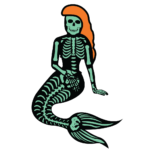
SkeleMermaid
Landing Pads

If you don’t already own the base Myth, but are still interested in using this skin, you can shop the Mermaid HERE!

Extended Myth Badge Lines

We mentioned earlier in the week that, as part of fulfilling our new Queen Munzee’s wishes, an extension to the Unique Myth Capture badge line (excluding the MythologiGals) and the Unique Modern Myth Capture badge line was in the works. As of this posting, the new badges are now live!

Unlike the Points in a Day badges, these will be fully retroactive.

We hope you enjoy seeing the SkeleMyths on the map, and that these badges will give you a new goal to shoot towards!

Munzee on!

October 19, 2022

In-App Map Link Update!

The focus of our Tech Team the past few months has been to address the unresolved Known Issues — namely the “GPS Sticking or Not Following” issue. We are happy to report that some of our beta testers have noticed that this latest app update has resolved these issues for them. If you’re still experiencing any GPS issues after trying a fresh install, please follow up with support@munzee.com so that we can investigate further. In the meantime, we’re also still investigating the floating pin issue some are encountering on Android.

In addition, today’s app update includes work on another improvement which we’ll go into detail about below, along with other various bug fixes and tweaks.

If you’re interested, you’ll need to download the latest update — which is 4.1.155 on Android and 4.1.156 on iOS — from your device’s App Store. If you do not see the latest update in the App Store, you’ll need to check back later. On Android devices, you could try clearing the cache of your Google Play Store app to see if you can force your store to refresh.

In-App Map Links!

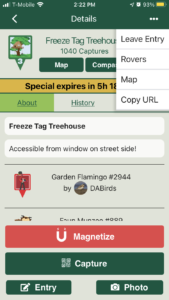
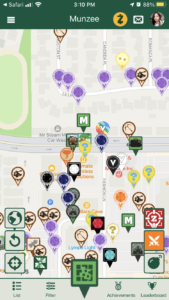
Similar to the Permalink feature on the Web Map, you can now generate links to specific munzees OR areas on the map from the app! Here’s how:

Specific Munzee Map Link:

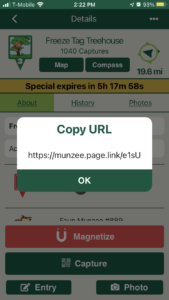
  1. Navigate to your desired munzee’s [Details] screen
  2. In the top-right corner, tap […]
  3. Tap [Copy URL]
  4. A popup with the URL will appear
  5. Tap [OK] on the popup
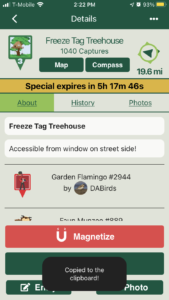
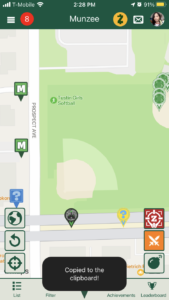
  6. Another popup should appear at the bottom confirming you’ve copied the URL to your device’s clipboard
  7. Paste where needed!

Map Area Link:

  1. Navigate to your desired area on the map
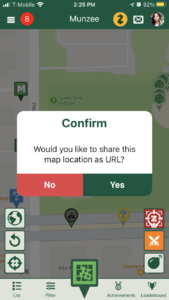
  2. Tap and hold your finger on the screen for 3+ seconds
  3. A confirmation popup will appear
  4. Tap [Yes] on the popup
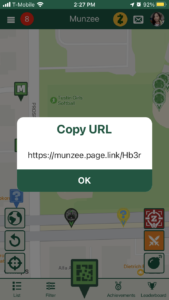
  5. A popup with the URL will appear
  6. Tap [OK] on the popup
  7. Another popup should appear at the bottom confirming you’ve copied the URL to your device’s clipboard
  8. Paste where needed!

Please note that creating links to bouncing munzees — i.e. Unicorns — will NOT work as they are not tied to a specific set of coordinates. If you navigate to a link created for a bouncing munzee as shown in the next section, it will always bring you to (0, 0) — the middle of the ocean.

In-App Map Links = Deep Links

When you tap on an In-App Map Link, it will work differently depending on the device being used to access them:

  1. If you’re using a laptop or desktop computer, the link will launch the Web Map centered on either a specific munzee or area on the map, depending on how the link was created
  2. If you’re using a mobile device:
    1. If you do NOT have the Munzee App installed, the link will launch your device’s App Store and navigate to Munzee’s app page so you can download the app
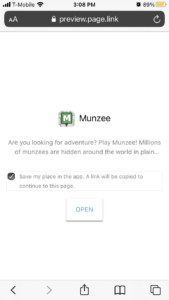
    2. If you do have the Munzee App installed, the link will launch an intermediary page, as you can see in the screenshot below
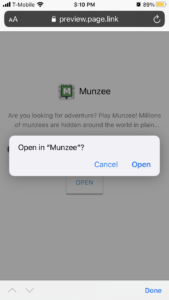
      1. Once you tap [OPEN], one more confirmation popup will appear
      2. Tap [Open] on that popup and it will launch the Munzee App, moving the map so that it is centered on either a specific munzee or area on the map, depending on how the link was created
        1. If the link is for a specific munzee, it will also display the Summary Panel at the top, as if you’ve selected it on the map!

If the link doesn’t open to the correct location, try tapping it again to reload! NOTE – players tapping the links must have the latest build installed for them to work as expected.

Use Cases

  • All players can now share a link to any Munzee or location on the map!
  • New players can share a location to ask for help and nearby deploys
  • Players looking to trade virtual deploys can drop a link to where they’d like it
  • Event Hosts can quickly link players to where to deploy for the event
  • Garden Builders can easily share a link to the location of their Garden
  • Sick or injured players requesting for nearby deploys while they recover

We hope you find this feature useful, and thank you for your continuing patience as we work to fix the outstanding app issues! If after installing this update, you are still experiencing the main issue mentioned above, please e-mail support@munzee.com with your device model and OS combo.

Munzee on!

October 19, 2022

Turn Your December Event into a Christmas Party!

We hope you are having something to look forward to each month with our Monthly Munzee Events!

? We’ve got a new Add-On Package you can upgrade your December Monthly Event with – it’s time to plan Christmas Parties! If you’ve already bought a December Event Package, contact Louise at events@munzee.com with your event number, desired badge design, badge text, and icon to add this to your event. If you haven’t bought a December Event Package yet, what are you waiting for?!

We are offering a great add-on package available for December Monthly Events:

For $50 you will get the following:

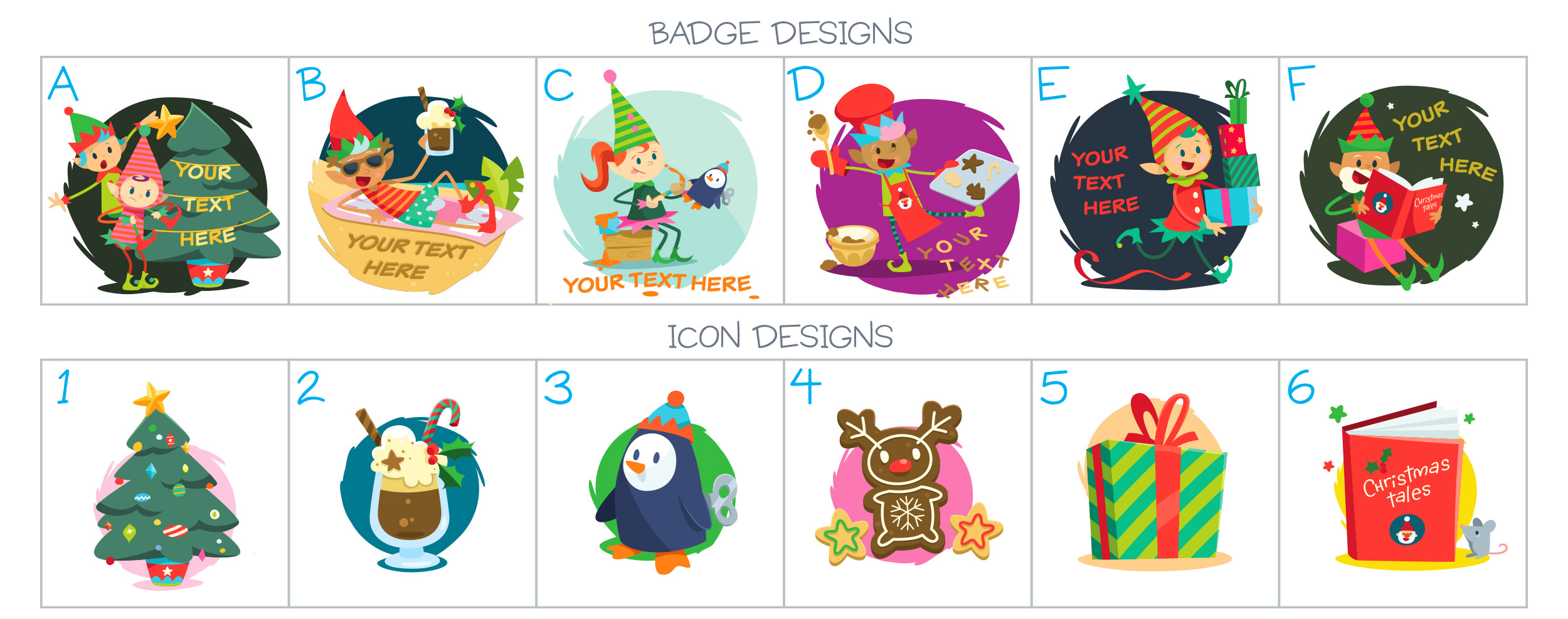
  • Choice of a badge and icon from these options shown above
    • Badge is customisable with event name / location
  • Emerald Pin for all attendees
    • The pool is being refreshed and requests for new emerald gardens should be emailed to events@munzee.com please!
  • 50 Exclusive Munzee Event Christmas Party 2022 cards

If you haven’t already, the first step is to get your event on the calendar: https://calendar.munzee.com/submit

Then purchase the 2022 Monthly Event Package for December using your event token received via email: https://store.freezetag.com/collections/event-packages

You will then receive an email which kickstarts your communication with Louise so you can work on getting your event set up! From there let Louise know you want to upgrade your December event with the Christmas Party Add-On — don’t forget to mention your desired badge design, badge text, and icon! — and she will send you an invoice.

We look forward to seeing all your events on the calendar and celebrating the holidays with you! ?

Munzee on!
-Louise

**Event accounts are only to be used for deploying munzees for the event. Capturing munzees, completing ZeeOps, earning and using additional prizes, and any other “normal” gameplay on the event account is a violation of the code of conduct.

October 14, 2022

Calculate Your Pumpkoin Balance with this NEW Mech!

In our first Pumpkoins post, we mentioned that another tab in the Redeem Store would appear later on. As planned, this tab contains items that will remain available through 02:30 MHQ on Thursday, November 3rd (the expiration date we had set for Pumpkoins) — so you don’t need to worry about them going away like the items in the [Pumpkoins (Week X)] tab (which swaps out on 12:00 MHQ every Friday)!

The main change you’ll notice is that this new tab is limited to Premium members only.

Currently there’s only one item in there right now, so here’s everything you need to know!

Count Calcula Details

Like the other Munzee Mechz, Count Calcula is a temporary POB that will remain on the map until it has been captured 5 times. At 12:00 MHQ today, it was made available in the Redeem Store in the [Pumpkoins Surprises] tab for 25 PC. If you decide to make the trade, a Count Calcula will be automatically deployed on your account at once! You will also receive the Blueprint to rebuild it when you have earned enough Cogs in the future.

Count Calcula
Points
  • Deploy: 678
  • Capture: 150-250
  • CapOn: 123-234
  • Nesting (5th Cap): 500
Landing Pads

You can find these toothy tools flying to the landing pads above every 6 hours or when captured.

Count Calcula will be available for multi-capture. That means players can capture a Count Calcula on their own munzees, any previously captured munzees, and more than once if the same Count Calcula visits you. Count Calcula is non-blastable. He will be attracted to both Physical Magnets and Virtual Magnets. You can access him by turning on your “All Expiring Specials” filter.

When a Count Calcula is captured, it will scatter up to 3 BATteries.

BATtery
Points
  • Capture: 50
  • CapOn: 25

These scatters will be visible to any player and will be deployed on the Mech owner’s account. This means that unlike Air Mystery Feathers/Boulders, there are CapOn points for the owner!  They expire after 120 minutes, have a capture radius of 300 feet, and you’ll be able to use Rover Treats to capture them as well. These scatters will NOT count for deploy streaks, ZeeOps, or clan activity since they are passive deploys.
Badges

Deploying a Count Calcula will earn you the corresponding Blueprint badge, which you can see below. There is also a badge that you can earn by capturing a Count Calcula — but since there’s only one badge in this line, we’ll keep it a secret for now.

Count Calcula Blueprints- Deploy 1 Count Calcula Munzee.

We hope Count Calcula makes math a little less scary!

Munzee on!

October 13, 2022

Halloween Greeting Cards + ZEE-Dayz

As promised, our ZEE-Dayz is starting now with double points on all Greeting Cards from Thursday, October 13th at 12:01 MHQ through Sunday, October 16th at 23:59 MHQ.

To make sure you can maximize your points and Pumpkoin earnings, we have 5 new Limited Edition cards AND 5 old Limited Edition Cards for your deploying pleasure! You can head to the Greeting Card collection HERE to see everything, or read on for the direct links to each item, PLUS some more details on the double points period!

NEW Greeting Card Munzee Details

The first is a bit different compared to the others, as it’ll scatter 1 Screaming Balloon Munzee upon deploy as shown below, on the card owner’s account.

Screaming Telegram Card Screaming Balloon Scatter
Points Points
  • Limited Edition
    • Deploy: 60
    • Capture: 50
    • CapOn: 30
  • Capture: 50
  • CapOn: 33

What makes the scatter unique is that it will remain for the ENTIRE 7-Day period, rather than disappearing upon first cap, AND it will be blastable. So, it’s basically 2 deploys in 1! If you get lucky, the balloon may end up closer to your desired location if the area is densely packed, as scatters are not subject to the same proximity rules as Greeting Cards.

For this reason, as it has the potential to earn you more points than the normal Limited Edition Cards, we’ve made it a 2-pack for $1 instead of the usual 3-pack. You can shop the Screaming Telegram card HERE!

The Screaming Balloon will have a capture radius of 300 feet, and you’ll be able to use Rover Treats to capture them as well. They will NOT count for deploy streaks, ZeeOps, or clan activity since they are passive deploys.

The remaining 4 are additional “Greetings From…” cards, this time with some more spooky locations! You can shop them HERE, along with the previous batches of cards, if you missed out!

As they are all Limited Edition cards, the points are as follows:

  • Deploy: 60
  • Capture: 50
  • CapOn: 30

You can stock up on these cards and save them for later (the Screaming Telegram cards will still scatter), BUT they will only be in the store until 12:00 MHQ on November 1st!

Past Halloween Greeting Cards Return!

You may recall that we released the CHOMPliment Greeting Cards last year! We thought it might be nice for us to bring them back for a short while.

You can shop the past Halloween Cards HERE! They will also leave the store at 12:00 MHQ on November 1st!

General Info

Don’t forget to edit the title and the notes to add a personal touch! While the capture message will contain your Munzee username as all Greeting Card capture messages do, we think typing in a more specific note will go a long way to creating a more unique and special experience!

Remember that these munzees will be archived 7 days after they are deployed, so make sure your intended recipient captures it before then!

Helpful Links:

We hope you enjoy sending ghoulish greetings this weekend!

Munzee on!

October 10, 2022

Changes to Joining a Clan

By now, you’ve probably seen at least one of the posts we put out earlier this month encouraging you to give Clan Wars a try! While we’ll continue to monitor your feedback on the Clan War Requirements, they aren’t the only things we’re looking to change and improve.

We want to ensure a competitive and fair battleground, so certain changes have been made regarding how players can join a clan. Moving forward players will only be able to join a clan until the 12th of each month. After the 12th you will be unable to join a new clan. When the 13th day of the month starts at MHQ it will be TOO late.

To help newer players take part in Clan Wars we’ll still allow accounts 90 days old and under to join all month long, but we still encourage solidifying your team by the 12th. We appreciate your understanding that these changes will benefit the integrity of Clan Wars as a whole.

As part of the app update that enforces this change, error popups have been added that will clearly show this new rule. That way, even those who haven’t yet seen this post should be aware of the new rule once they see the popups. This goes into effect October 13, 2022 – so be sure you join a clan BEFORE then if you are interested this month.

Munzee on!

October 7, 2022

Redeem Pumpkoins for Prizes!

You’ve heard of Candy Corn Credits, C04L Credits, Sham Rock Credits, and Painted Rose Credits — now get ready for Pumpkoin Credits! After reviewing the activity on Painted Rose Credits and making some improvements (we hope ?) we’ve created a new limited-time credit for you to earn and redeem!

Like Jewel Shards, Weapon Shards, and Cogs, you’ll be able to redeem Pumpkoin Credits (PC) at the Redeem Store for game pieces. However, like the past limited-time credits, they can only be redeemed until 02:30 MHQ on Thursday, November 3rd (when November Clan Wars starts).

How to Earn Pumpkoin Credits

Pumpkoin Credits can be earned from now until 23:59 MHQ on Monday, October 31st.

You can earn them the following ways:

Goodies You Can Get With Pumpkoin Credits

As usual, the most up-to-date list of what’s available will be what you see on munzee.com/redeem. Like the tabs for Painted Rose Credits, you’ll only be able to redeem items in the “Week 1” tab during Week 1, after which, only the “Week 2” tab will be visible until Week 3, and so on. So make sure to spend your credits each week!

The rewards/rates may change from time to time, but to start off with, this is what we have planned:

  • ALL Players:
    • 1 Fall Greeting Card: 1 PC, limited to 1 per non-Premium player, 5 per Premium player
    • 1 Wish I Was Here Greeting Card: 1 PC, limited to 1 per non-Premium player, 5 per Premium player
    • 1 Physical Magnet: 5 PC, limited to 1 per non-Premium player, 2 per Premium player
    • 1 Virtual Magnet: 5 PC, limited to 1 per non-Premium player, 2 per Premium player
    • 5 Cogs: 20 PC, limited to 1 per non-Premium player, 2 per Premium player
  • Premium Players:

However, you may see another tab appear later on, which will contain items that will remain available through the end of the month — this should appeal to those who are saving up!

We hope you enjoy cashing in these shiny new Pumpkoins!

Munzee on!

October 5, 2022

A Frightening Flat ZEE-Dayz!

While we announced our plans for a Greeting Card ZEE-Dayz well in advance, we didn’t want to leave this weekend out with nothing special going on!

ZEE-Dayz Bonus Details

From the period of Saturday, October 8th at 00:01 MHQ through Sunday, October 9th at 23:59 MHQ, enjoy double points on Flat Friends and Flat Objects!

Please note that Fancy Flats are excluded.

Friendly Reminders

Flat Friends/Objects are part of this month’s Clan War Requirements! To encourage more Clan War gameplay, we’ve moved requirements for specific munzee types, including those for Flat Friends/Objects, out of the Individual Requirements and into the Clan Requirements. We hope this allows your clan more flexibility in planning how to tackle each level!

We’ve also got quite a few events going on during this ZEE-Dayz! Don’t forget to check out the Munzee Calendar to see where you might like to deploy some munzees to get some capon points! While Greeting Cards are much easier to deploy due to their temporary nature, you may want to save them for the weekend of the 13th through the 16th as mentioned above. Then again, Greeting Cards are such a bargain, so you may decide to deploy both Greeting Cards AND Flats, if you can find the perfect spots on the map!

We hope you enjoy capping our flattened staff members this weekend!

Munzee on!