GAMEPLAY

September 27, 2025

🥗 October MunzShroom 🍄

An immaculate new chef has joined the kitchen! This NEW légumier MunzShroom is ready to make fresh vegetables the star of the show! Add the CapReese MunzShroom to your collection by completing your capture streak in October and look forward to healthy and tasty salads!

If you completed your September capture streak, prepare to receive the OmeLetitia MunzShroom Skin (and corresponding badge) in early October. Read on to learn more about the latest addition to the MunzShroom family!

September MunzShroom Reminders

If you haven’t picked up a base MunzShroom yet, they are available in the Freeze Tag Store for $4.

As a reminder, this is how to have a permanent MunzShroom on your account next year:

  • Own at least 8 MunzShrooms by the end of the year.
    • Each month, the price of a MunzShroom will decrease by $1.
    • However, players can only purchase 1 MunzShroom every 28 days.

October MunzShroom Details

What MunzShroom awaits in October? The CapReese MunzShroom, a chef who prides himself on using the freshest ingredients! It is a temporary POB that will remain on the map as long as the players with permanent MunzShrooms continue to use it.

CapReese MunzShroom
Points
  • Deploy: 500
  • Capture: 250
  • CapOn: 300
Additional Info
  • Available for multi-capture
  • Non-blastable
  • Attracted to both Physical Magnets and Virtual Magnets
  • Filters: “All Limited-Edition Specials” and “All Expiring Specials”

As stated earlier, you’ll need to complete next month’s capture streak to earn this skin. Once the skin is awarded in November, you can change the skin on the MunzShroom to this one at any point! If you need some help refer to our Help Guide article for the instructions on swapping skins!

You can find this MunzShroom at the following landing pads every 6 hours or when captured:

Additionally, when captured, the CapReese MunzShroom will scatter up to 1-3 NEW MunzShroom Caprese Salads nearby!

MunzShroom Caprese Salad
Points
  • Capture: 50 points
  • CapOn: 50 points

Badges

As a reminder, MunzShrooms will have 4 associated badge lines:

  • Unique type deploy badges — you’ll need to earn each month’s skin by keeping your streak up!
  • Overall deploy badges — the more MunzShrooms you deploy, the merrier!
  • Unique type capture badges — capture at least 1 of each skinned MunzShrooms!
  • Overall capture badges — capture as many MunzShrooms as you can find!

Check out the unique deploy and capture badges linked with the CapReese MunzShroom below!

Go ahead and indulge in the CapReese MunzShroom’s dishes — they’re not only delicious but good for you, too!

#MunzeeOn

September 26, 2025

🌐 Introducing the Nexus Personal Munzee! 🏷️

We’re so excited to be releasing the NEW Nexus Personal type! After working on it behind-the-scenes, you helped us decide what to call it! Then, after a bit more testing and refinement, a few lucky attendees got their hands on some prototypes at Munzee Mania 8! Now it’s finally ready for everyone to use!

What is the Nexus Personal?

The Nexus is a new type of Personal with one HUGE advantage: if a Premium user captures it, it will award the captures of the Nexus Personal AND ALL linked Personals! Otherwise, if a non-Premium user captures it, they will just be awarded the capture for the Nexus Personal by itself. This new tag will make it easier than ever to cap dozens of Personals at a time when attending events or gathering with friends. So if you’ve gathered quite the collection of Personal tags you’ll need the Nexus to take your game to the next level!

Please note deploying the Nexus Personal will NOT deploy the Personals linked to it at the current location — that’s something unique to the Premium Personal. Think of the Premium Personal as a tool for deploying, while the Nexus Personal is a tool for capping.

The Nexus Personal is a circular metal tag, and now available to purchase!

The Nexus Personal has the same point structure as Premium Personals:

  • Deploy: 25 points — You only receive deploy points for the original deploy, not every time it is redeployed
  • Capture/CapOn: Split of 100 points, minimum 20 points

Why did you create the Nexus Personal?

It benefits cappers by saving their time at Munzee Events or encounters with other Munzee players in the wild. No more time-consuming scanning through chainmail-like cables of dog tags — just one scan and you’re done!

It benefits deployers by minimizing their Munzee Event packing lists or even their everyday Munzee Toolkits. If you love collecting Personal tags but have found your collection difficult to lug around, now you need only bring your 1 Premium Personal and 1 Nexus Personal — just make sure to keep them up-to-date by linking any new ones you acquire.

How can I link other Personals to the Nexus Personal?

The process is very similar to that of the Premium Personal:

  1. On the details page of a Nexus Personal, click on a button called [Connected Munzees].
  2. Once the page has loaded, you have 2 options:
    1. Enter in the URL for one of your other Personal Munzees, and click [Link Munzee].
      1. NOTE: This ONLY works with Personal Munzees, and they must be owned by you.
    2. Click [Link All Personals], and all other Personal Munzees deployed on your account will be linked.
  3. After linking Personals, the page will reload to show them listed underneath the [Link All Personals] / [Unlink All Personals] buttons.
  4. If you want to un-link any Personal Munzees, you also have 2 options:
    1. For individual Personal Munzees, just click the trash can icon next to its name.
    2. Otherwise, click [Unlink All Personals] to start fresh.

Where can I get a Nexus Personal?

At the Freeze Tag Store here: https://store.freezetag.com/products/nexus-personal

Anything else I need to know about Nexus Personals?

Both “regular” Personals and Premium Personals can be linked to Nexus Personals. If a Premium user captures a Nexus Personal with a Premium Personal linked to it, that Premium user will be awarded the capture of the Nexus Personal, the Premium Personal, AND ALL Personals linked to the Premium Personal.

Personals and Premium Personals Return (VERY SOON)!

Of course, the Nexus Personal is nothing without “regular” Personals and Premium Personals to link to it! Collectors old and new will be happy to know that we’re working hard to be able to offer these miniature works of art once again in the Freeze Tag Store! Our plan is to release new Personals, and the Premium Personal next week!

We hope you’re just as excited as we are to put the Nexus Personal to use at the next Munzee Event!

Munzee on!

September 26, 2025

🎃 October 2025 Bonus Events Schedule 📆

This October we wanted to spread the love throughout the ENTIRE month — so instead of bonus events only on the weekends, we have bonuses going on every day of the week!

Don’t forget to RSVP to any nearby Munzee Events, and read on below for all the bonus dates and details you won’t want to miss!


Bonus Event Day(s)

Date(s) Bonus ON
Wednesday, October 1st at 00:01 MHQ to Friday, October 31st at 23:59 MHQ
(ALL MONTH!)
Greenies, Cards
x2 points for everyone!
Wednesday, October 1st at 00:01 MHQ to Thursday, October 2nd at 23:59 MHQ,
Monday, October 13th at 00:01 MHQ to Thursday, October 16th at 23:59 MHQ,
Monday, October 6th at 00:01 MHQ to Thursday, October 9th at 23:59 MHQ,
Monday, October 13th at 00:01 MHQ to Thursday, October 16th at 23:59 MHQ,
Monday, October 20th at 00:01 MHQ to Thursday, October 23rd at 23:59 MHQ,
Monday, October 27th at 00:01 MHQ to Thursday, October 30th at 23:59 MHQ
(Mon – Thurs ALL MONTH!)
All magnetizable types will attract DOUBLE the amount of bouncers!
x2 magnet strength for everyone!
Friday, October 3rd at 00:01 MHQ to Sunday, October 5th at 23:59 MHQ,
Friday, October 10th at 00:01 MHQ to Sunday, October 12th at 23:59 MHQ,
Friday, October 17th at 00:01 MHQ to Sunday, October 19th at 23:59 MHQ,
Friday, October 24th at 00:01 MHQ to Sunday, October 26th at 23:59 MHQ,
Friday, October 31st at 00:01 MHQ to Friday, October 31st at 23:59 MHQ
(Fri – Sun ALL MONTH!)
Temporary Virtuals, Flats (excluding Fancy Flats)
x2 points for everyone!
Saturday, October 4th at 00:01 MHQ to Saturday, October 4th at 23:59 MHQ,
Tuesday, October 7th at 00:01 MHQ to Tuesday, October 7th at 23:59 MHQ,
Saturday, October 11th at 00:01 MHQ to Saturday, October 11th at 23:59 MHQ,
Tuesday, October 14th at 00:01 MHQ to Tuesday, October 14th at 23:59 MHQ,
Saturday, October 18th at 00:01 MHQ to Saturday, October 18th at 23:59 MHQ,
Tuesday, October 21st at 00:01 MHQ to Tuesday, October 21st at 23:59 MHQ,
Saturday, October 25th at 00:01 MHQ to Saturday, October 25th at 23:59 MHQ,
Tuesday, October 28th at 00:01 MHQ to Tuesday, October 28th at 23:59 MHQ
(Tue + Sat ALL MONTH!)
Scatters
x2 points for everyone!

Cap it. Deploy it. Double it. Repeat! With bonuses all throughout October, we hope there’s no trick to get all your treats this month!

#MunzeeOn

September 25, 2025

🪐 NEW Roman Modern Myth Skins! 🧑‍🚀

After ironing out the kinks with our NEW Skin Randomizer feature, we wanted to give you even more options for bouncers you may already own! This time we came up with a fun twist on our Modern Myths: though the Greek Gods seem to be quite well-known (at least here in the US), they do have Roman counterparts — so we’ve reimagined our Greek Modern Myths as part of a unique astronaut crew!

Roman Modern Myth Skins

With this release, we have some exciting news — the scatters from ALL Greek and Roman Modern Myths will now be deployed on the Bouncer Owner’s account, rather than the virtuals account as they have been in the past. Now you can rake in even more points from CapOns!

These skins are available in the Freeze Tag Store for $5 each! They will remain in the store until 12:00 MHQ on October 9th. You can shop them HERE!

If you don’t already own the base Myths, but are still interested in using these skins, you can shop them HERE, but keep in mind that the base Myth will also need to be upgraded in order to use the skin. If you haven’t upgraded your base Myth yet, you can purchase a Bouncer Upgrade Credit.

Roman Modern Myth Skins
Landing Pads

In keeping with the Greek Modern Myth line, when these Roman Modern Myths are captured, 3 new munzees will also be scattered nearby!

Roman Modern Myth Scatters
Points
  • Capture: 50
  • CapOn: 25 to be on par with Norse Modern Myths (corrected from original posting at 12:00 MHQ)

For more information on Skins, you can check out our Help Guide articles HERE and HERE.

Munzee on!

P.S. Though we don’t typically do new badges for Myth Skins, you’ll definitely be seeing more of this celestial crew in the future! 🚀

September 18, 2025

👀 Did You Notice These NEW CuppaZee Features? ☕✨

The Template option wasn’t the only update to CuppaZee when we released the Electric Eel Gardens a few weeks ago! Eagle-eyed CuppaZee users may already be aware of these changes, but we wanted to make sure nobody missed out on improvements to their CuppaZee and Munzee experience!

Easily Check Garden Pin Captures!

This is for those of you who are trying to earn the badge for capturing all the pins in a BVG — though it also applies to regular Gardens as well! We know it can sometimes be difficult to tell if you’ve captured ALL the pins, especially if you capture pins from multiple BVGs in the same day.

If you’ve captured at least 1 pin in a Garden, you will see a NEW “Your Capture Progress” section next to the “Garden Status” section when you view that Garden on CuppaZee:

In addition, if you click on any of the buttons in the “Garden Pins” section to view the list of munzees in a panel on the right, the pins you have captured will show the red checkmark pin icon next to it, like so:

Now that you can easily check if you’ve captured all the pins in a Garden, you won’t have to guess if you should have earned a badge or not! As always, if you have met the requirements for a badge but haven’t received it, AND it’s been more than 1 MHQ day since you’ve met the requirements, please feel free to submit a support ticket by e-mailing support@munzee.com!


Move Multiple Garden Layers At Once!

Click on the new [Move Layers] button in the bottom-left corner of the Layers panel, then check the box next to each layer you’d like to move!

You can also rotate multiple layers together as well!


Copy Garden Layers!

Click the [∨] button next to the layer you want to copy to expand its view. Then click [≡] next to its name to access its individual menu. You’ll see a new [Copy Layer] button there!

You’ll have the option to copy a blank layer (meaning, a layer with an empty grid of the same layout, rotation, width, height, and location) or a true copy, pins and all.


These are just a few of the MANY updates Sam has worked on recently — to view the complete list, head over to the CuppaZee Changelogs at https://web.cuppazee.com/settings/changelogs (at the time of writing, the latest log is 2025.09.03a)!

Munzee on!

September 15, 2025

🦉🕰️ Find NEW Widdlz Inside Cuckoo Clock Munzees! 🕰️🐦‍⬛

Time is ticking and the seasons are beginning to change, but depending on which side of the hemisphere you’re on that might look quite different! To celebrate the Autumn and Spring seasons approaching, we’ve put together TWO NEW Cuckoo Clock Munzees so you can count down (and earn daily prizes!) no matter where in the world you are.

And that’s not all! Within each Cuckoo Clock is a limited edition Widdl, which is only available through these unique prize boxes. Whether you’re chasing shiny objects down under with the Widdl Magpie, or hooting through the fall leaves with the Widdl Owl, these clocks will keep you on time each day for 12 days straight!

Shop Cuckoo Clock Munzees HERE or read on to learn all about these chirping time pieces!

NEW Cuckoo Clocks – $15

Much like the Dice Tower and Ratloz, this unique new Munzee will award prizes and also work as a Bouncer Destination. Based on capsule antique cuckoo clocks, there are two seasonal themed game pieces available for purchase.

  • Capture 1 Cuckoo Clock every day for 12 consecutive days to win a daily prize!
  • Once you receive your prize, it auto-magnetizes an extra bouncer as a bonus reward!
  • LIMIT: 2 per player
  • Available until Wednesday, October 1st at 12:00 MHQ.
    • Purchase the Swooping Cuckoo Clock which awards the Widdl Magpie HERE!
    • Purchase the Hooting Cuckoo Clock which awards the Widdl Owl HERE!

NEW Cuckoo Clock Details

  • Capture the Cuckoo Clocks once a day to receive a prize
    • It MUST be captured 12 days in a row to receive all 12 prizes, similar to a mailbox and the Dice Tower.
    • You might receive a different prize than others on a given day, but everyone will have received all the same prizes by the end of the 12 days.
    • It will be auto-archived at the end of the 12th day after being deployed.
  • After receiving a prize, the Cuckoo Clocks will be auto-magnetized to attract 1 bouncer for you to capture
    • NOTE – It may take some time for a bouncer to land, so be sure to check back again soon
  • The Cuckoo Clocks also acts as a standard landing pad, which means you can capture a bouncer anytime it lands there!
  • Other players will also be able to capture your Cuckoo Clocks, but will not receive a prize.
    • Non-owners can also capture it whenever a bouncer is sitting on it.
  • The Cuckoo Clocks may be moved to new locations in order for the owner to keep up with the daily prize captures.
    • NOTE – If a bouncer is sitting on the Cuckoo Clocks when moved, it will be force nudged and removed
Swooping Cuckoo Clock Hooting Cuckoo Clock
Points Points
  • Deploy: 250
  • Capture: 10
  • Deploy: 250
  • Capture: 10
Bouncers Bouncers

NEW Widdl Details

Like the Widdl Zombie, the Widdl Magpie and Widdl Owl are no ordinary Widdlz — they’re already maxed out at Level 10, so you’ll be raking in those high-tier points right from the start! Plus, you can redeploy these Widdlz directly from a Wishing Well for just 25 Stars, just like your other Level 10 Widdlz. As a reminder, this is a temporary POB that will remain on the map for 5 days.

Widdl Magpie Widdl Owl
Points Points
  • Deploy: 373
  • Capture: 258
  • CapOn: 88
  • Deploy: 373
  • Capture: 258
  • CapOn: 88
Landing Pads Landing Pads

These Widdlz can be spotted on the landing pads listed above every 1 hour or when captured.

These Widdlz will be available for multi-capture. That means players can capture these Widdlz on their own munzees, any previously captured munzees, and more than once if the same Widdl visits you. These Widdlz are non-blastable. They will be attracted to both Physical Magnets and Virtual Magnets. You can access these Widdlz by turning on your “All Expiring Specials” filter.

Well Wisp Scatter Bonus

When these Widdlz are captured, they will scatter a Well Wisp nearby to start a trail. These are the same Well Wisps from the Daily Stroll, which will be deployed on the Wishmaster account.

Well Wisp
Points
  • Capture: 50

These scatters will only be visible to the capper and expire after 120 minutes. They have a capture radius of 300 feet.

Badges

We’ve created 3 NEW badges as extra prizes for you to collect from each Cuckoo Clock! Plus 1 NEW badge for deploying each Widdl! Below, you can see what the deploy badge looks like for each, but we’ll keep the rest hidden for now!

Get yours TODAY to decorate the map with these whimsical wooden wonders and receive the prizes inside before it’s too late!

#MunzeeOn

September 9, 2025

☕ Grab a Cuppa Before Gardening in this Flat Scatter Event! 🪴

With the smashing successes of the Fall-themed Bouncing Virtual Gardens and the Electric Eel Template Gardens, in no small part due to Sam’s quick coding, we wanted to highlight his contributions with this year’s new Flat Cup Scatter badge. Will you be able to collect all of the different drinks to earn it?!

Limited Time Scatter Details

From the period of Tuesday, September 9th at 12:00 MHQ through Sunday, September 14th at 23:59 MHQ, when you capture a Flat Cup, up to 3 different Coffee Drinks may be scattered nearby!

As with other Flat Scatters, the Drinks will be visible to any player and will be deployed on the Flat owner’s account. This means that unlike Feathers / Boulders, there are CapOn points for the owner! They expire after 120 minutes, have a capture radius of 300 feet, and you’ll be able to use Rover Treats to capture them as well! These drink scatters will NOT count for deploy streaks, ZeeOps, or clan activity since they are passive deploys.

The rewards for Coffee Drinks are as follows:

  • Capture: 50 points
  • CapOn: 25 points

For more information about the Flat Cup, check out our Help Guide article!

Badges

We’ve created 1 new badge for this special period! In addition, if you missed out on the badges from the original launch event, you’ll be able to earn them as well. You can see what these badges look like below. Make sure you cap as many Flat Cups as you can to receive all the badges!

Sale🏷️ Buy 2 Get 1 Free!

Need more Flat Cups near you? Try trading deploys with other players — post in our Discord forum for the quickest response!

For the same time period as the scatters mentioned above, enjoy a special offer: Buy 2 Flat Cups and get 1 FREE! Stock up on these Flat favorites before the coffee gets cold!

You must add at least 3 Flat Cups to your cart in the Freeze Tag Store to use the discount with no limit in place (6 = 2 free, etc.). There is NO CODE required — the discount should apply automatically! Please make sure that you see the discount apply BEFORE you complete your purchase — otherwise, you’ll need to e-mail support@munzee.com as we’ll need to manually issue a partial refund later!

We hope you have a hearty breakfast in addition to this delicious drink — gardening is hard work!

Munzee on!

September 5, 2025

👻🍬 Fun Frights October Event Packages! 🎃😱

Prepare to Monster Mash, because next month we’re celebrating Fun Frights with a new set of October Event Packages! For the month of October you can upgrade your event with a special package showcasing spooky activities that are just as frightful as they are fun! 

For $75 you will receive:

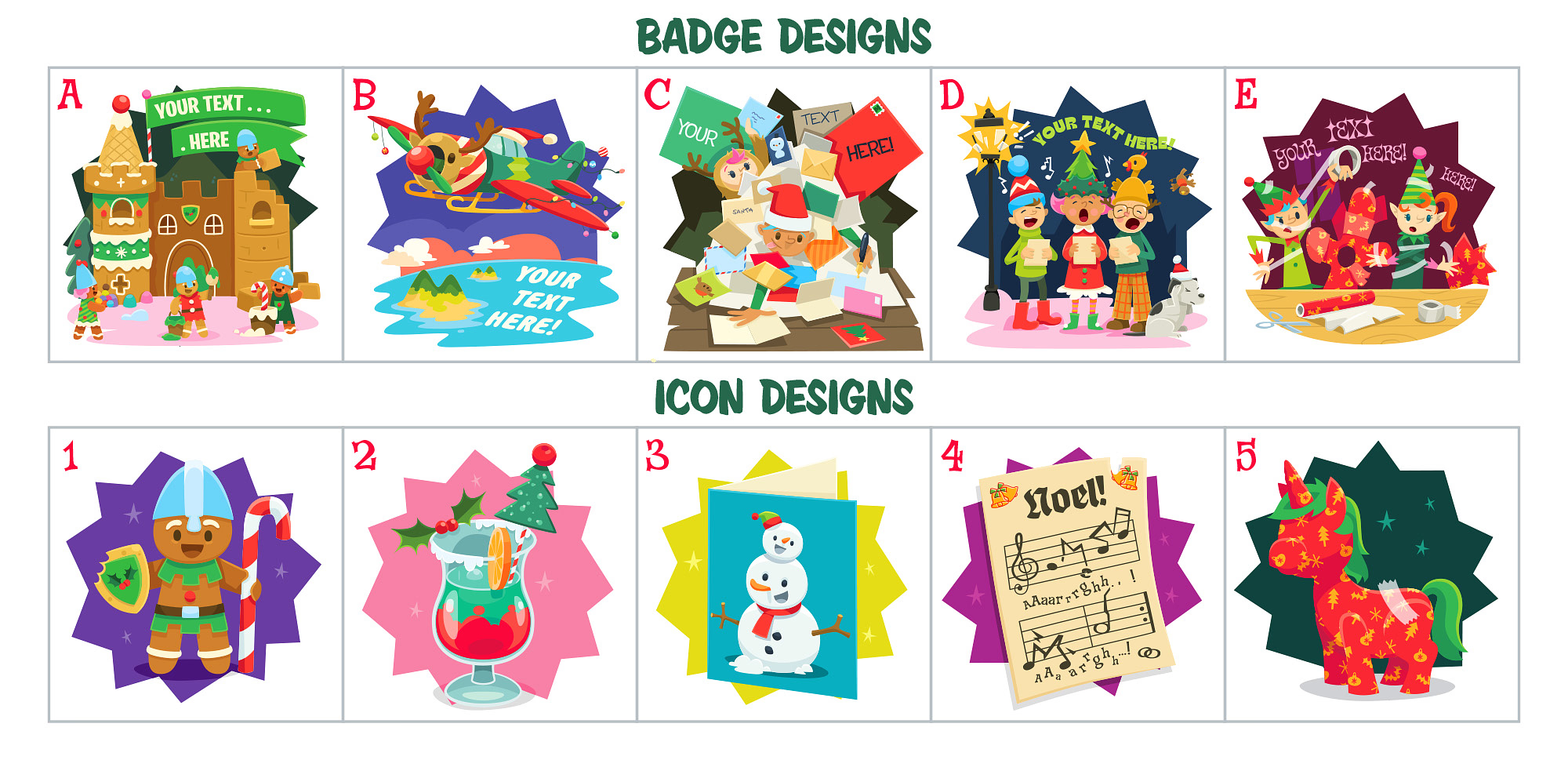
  • Choice of a badge and icon from the options shown below (badge is customisable with event name / location)
    • + DOUBLE CAKE on the badge = 100 cake for badge
  • 50 Exclusive Event Greeting Cards
  • Something new (credit/virtual) for each attendee that is sure to encourage competition…launching early October
  • No proximity restrictions (apart from standard event pin 100ft rules)
  • Fun Frights Host badge (up to 4 hosts)
  • Fun Frights Attendee badge
  • 25% Discount code for your guests to use in the FT online store on select products like zeds and blasts
    • Code will be available for 48 hours from your event time – one use per player, only for event attendees

Contact Louise at events@munzee.com with your event number, desired badge design, badge text, and icon to add this to your event!

Customisable Badges and Icons:

Personalise your Fun Frights Events by choosing from four available badges and icons. Whether you’re looking to bob for bubbling poison apples, or stuff a screaming scarecrow it’s sure to be a frightfully fun time!

Customise each badge with the event name and/or location.

Here are your Fun Frights art options:

Exclusive Event Greeting Card:

Straight from the pumpkin patch, your attendees will receive 50 exclusive Fun Frights Event Cards. This scarecrow is stuffed with plenty of festive spirit!

Event Set-Up:

Remember, at Munzee events, you can enjoy the fun and have your cake and eat it, too! So don’t forget to grab your Munzee Cake Credits, which will allow you to collect sweet party favours throughout the year!

**Event accounts are only to be used for deploying munzees for the event. Capturing munzees, completing ZeeOps, earning and using additional prizes, and any other “normal” gameplay on the event account is a violation of the code of conduct.

We’re looking forward to seeing your events marked on the calendar and hearing about all the fun as you host your very own Fun Frights Munzee Event!

Thank you for hosting and attending!
Louise

#MunzeeOn

September 4, 2025

✨ NEW Skin Randomizer to Shuffle Styles 🔀

Love collecting skins, but don’t enjoy the hassle of changing them every time? We’ve got just the thing for you! Introducing the Skin Randomizer – a brand-new feature that lets your bouncers automatically rotate through your owned skins. Now your collection can shine without any extra work from you!

How It Works

The Skin Randomizer is available exclusively for Premium Members. Once activated, each time your bouncer is captured, its skin will automatically switch to a different one from your owned collection. It’s the perfect way to keep your Munzee map fresh and full of surprises!

Here’s how to activate the feature (in-app or on the Munzee website):

  1. Go to the Munzee Details page of the bouncer you’d like to manage
  2. Tap the option to Convert
  3. Select the new Skin Randomizer option in the list to toggle it on
  4. Confirm your choice – and you’re set! The next capture on that bouncer will trigger an automatic skin change.

👉 Not Premium yet? Sign up HERE today in our online store to unlock this and tons of other exclusive features, bonuses, and benefits!

Skins Back in Stock!

To celebrate this launch, we’ve brought back a handful of fan-favorite skins in the Freeze Tag Online Store! If you missed out on them the first time, now’s your chance to grab them and make the most of the new Skin Randomizer feature. Missing a few from your collection? Don’t wait—snag them while you can HERE!

More Skins on the Way…

We’re just getting started! With the Skin Randomizer now live, you’ll want to make sure your collection is ready to shine. Keep your eyes peeled for brand-new skins arriving soon—your bouncers are about to get even more stylish!

#MunzeeOn

September 3, 2025

⚡ Add a Shock of Color to the Map with Electric Eel Gardens! 🐍🐠

Gardens don’t have to be big to be beautiful! We proved this last year with our Glow Worm Invasion — we loved seeing how your creativity manifested in tons of different variations on the Glow Worm Garden, despite having some strict parameters.

We wanted to bring back a similar challenge this year, but the Glow Worms have seemingly evolved into Electric Eels! Now you may be asking, what’s the difference between a Glow Worm and an Electric Eel? Well they’re shocking to touch for one thing! Each Electric Eel Garden will be made up of 8 Virtual Colors along with an Electric Mystery Munzee at the start and finish of each design.

We’ve also come up with a more streamlined process for crafting these new mini gardens– so instead of you creating the gardens entirely from scratch and transferring ownership to us like last year, Sam of CuppaZee has upgraded the Gardens tool to include a Template option! Here’s a walkthrough on how to use it:

How to Create Electric Eel Gardens

  1. Navigate to the [My Gardens] page in CuppaZee: https://web.cuppazee.com/gardens/my
  2. Click [+ Create New Garden] in the top-right corner
  3. Click [+ Create New Layer]
  4. Click [From Template]
  5. Click on the Electric Eel template
  1. Move the garden’s anchor point to where you’d like on the map — the tool will display a message below to show if the area is clear of Munzees that will block your garden
  2. Edit your layer name if desired
  3. Use the slider to change the rotation if desired
  4. Click [Add Layer]
  5. Use the [Draw] option on the right side of the screen to swap the Virtual Colors from the template to other Virtual Colors as you wish
    1. NOTE – ONLY VIRTUAL COLORS CAN BE CUSTOMIZED IN THIS TEMPLATE! Some templates will have certain types locked to keep the design of the overall template theme. The Electric Eel Template will have both Electric Mysteries locked, but the Virtual Colors can be changed to any color!
  6. When you’re ready, give your Electric Eel a name and publish the garden! *One garden per player account*
Step #10

How to find Electric Eel Gardens

If you would like to deploy in an Electric Eel Garden you or others have created, you can easily find them on CuppaZee Gardens by scrolling down to the new category in the Garden List page called “September 2025 – Electric Eels“:​

Badges

Also like last year, by deploying in an Electric Eel Garden you’ll earn an exclusive badge, plus a special additional badge if you deploy 10 or more virtuals collectively in Electric Eel Gardens* as well. We’re keeping the badge designs a secret for now, but they will be delivered in early October as long as you fulfill the criteria.

To give you an idea of what they look like, here are the Glow Worm badges from last year:

Special Store Pak!
For those of you who are raring to build, we’ve put together a Electric Eel Garden Pak, which is available in the Freeze Tag Store. This Pak includes everything you need to help deploy Electric Eels across the world for the very discounted price of $25!

  • 8 Virtuals
  • 8 Virtual Color Credits
  • 2 Electric Mysteries

#MunzeeOn

* Must be created using the [From Template] option as described above — they will be tagged with “Based on Electric Eel by munzee
** Additional gardens per player may be requested later this month. One per player at time of release.